
Transfer Manager
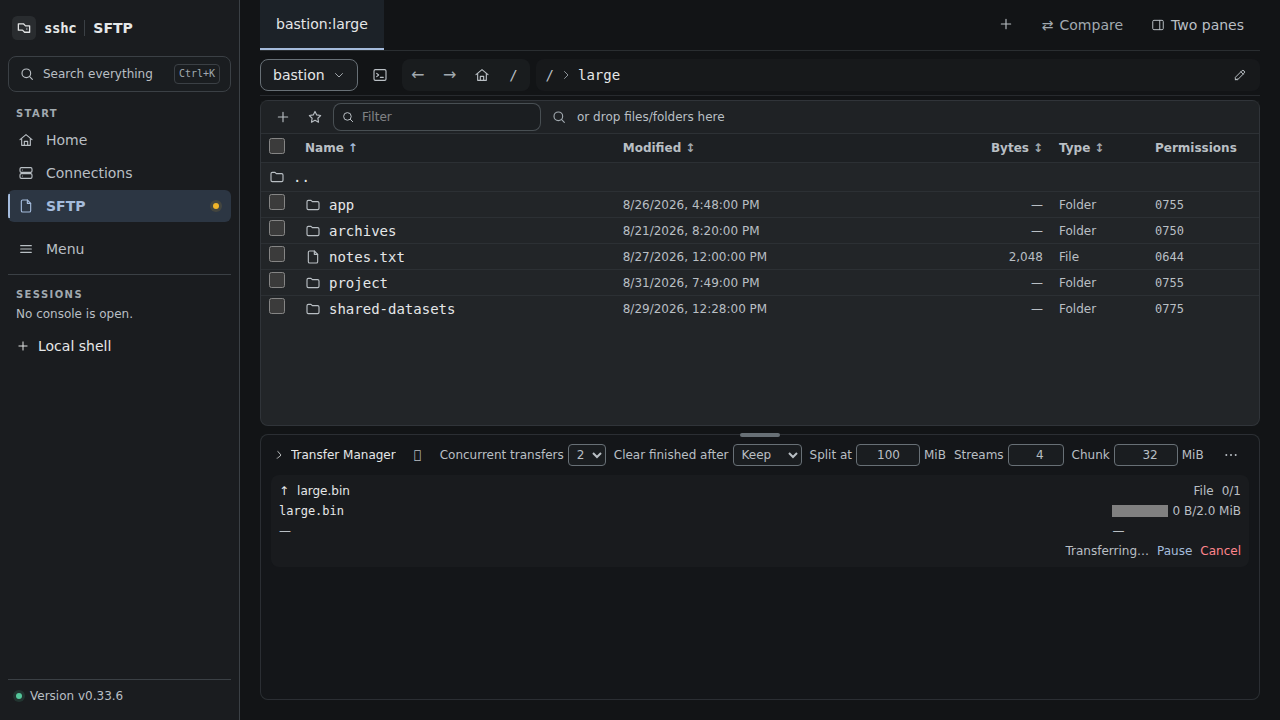
File upload, folder upload, file download, folder download, and remote-to-remote copy or move share one queue. Two transfers run concurrently by default. The Transfer Manager is docked below the SFTP view and normally shows only the active count, aggregate progress, and speed. Expand it for per-file status and controls.
While expanded, drag the grip on its upper edge to resize the job list. Mobile resizing snaps to three useful heights, while desktop resizing remains continuous; each viewport keeps its own saved height. With the grip focused, the arrow, Home, and End keys provide the same control from a keyboard.
Each job shows per-file progress, transferred and total bytes, current speed, remaining time, and a queued/running/paused/completed/failed/canceled state.
- Pause stops new reads and writes while retaining recovery state.
- Resume continues a file transfer when its recovery requirements are met.
- Retry reruns failed files only.
- Cancel ends the job.
- Clear finished removes completed and canceled entries from the view.
- Remove from list dismisses one completed, canceled, or failed entry. Clear failed dismisses failed entries without clearing successful history.
- Auto-clear finished set to anything but Keep (30 seconds, 5 minutes, 1 hour) removes completed entries that long after they finish. The setting is stored by the engine and shared by every screen.
- Stop starting new transfers lets running transfers finish while queued entries show as Held and do not start; Resume processing the queue reverts it.
- Queued entries can be reordered with the ↑↓ controls on their rows; running and finished entries stay where they are.
The overflow menu only appears when at least one bulk action is currently available. A cancel request that races with completion is idempotent and keeps the completed result. If sshc cannot remove an upload's remote temporary file, it keeps the failed entry visible with an explanation so that you can retry cancel or removal after restoring the connection.
Uploads use a temporary file in the target directory, verify the complete contents, and atomically rename it on completion. Existing destinations require confirmation. After a reload, select the same local file again. If its name, size, and modified time match and the remote temporary file is still usable, the upload skips ranges already recorded as complete and continues with the remainder.
File downloads resume through HTTP Range when the browser retains the downloaded prefix and its revision still matches the remote file. Folder downloads stream a ZIP and cannot resume from the middle: after a pause, failure, or reload they restart at byte zero. Android hands the completed ZIP to the system file picker.
You can expand the Transfer Manager and edit split-transfer defaults even when the queue is empty. Large uploads and downloads initially divide files of at least 100 MiB into 32 MiB ranges and process them over up to four independent SFTP connections. Enter any integer threshold from 16 to 1024 MiB, stream count from one to 128, and chunk size from 8 to 4096 MiB; one stream disables splitting. The actual connection count is capped by the number of unfinished chunks. The engine persists these settings and shares them with the Web UI and CLI. sshc sftp settings displays or saves the defaults, while the same options on get or put override one invocation.
Regular files up to 512 GiB can be uploaded or downloaded. A split upload preallocates a remote temporary file and writes non-overlapping ranges through independent connections; the engine persists completed ranges in its transfer queue. To guarantee that download retries use the same remote contents, the engine first prepares the entire file in its private spool, so keep roughly the file size available as temporary free space. Folder downloads packaged as ZIP use a separate limit.
The engine Transfer Manager owns the queue and atomically persists it in ~/.ssh/sshc/transfers.json. Registration, ordering, progress, concurrency, overwrite approval, and recovery checkpoints survive browser or WebView reloads and are restored after an engine restart. Views reconcile with the engine every two seconds, so multiple open views converge on the same queue.
The browser or WebView still performs local file I/O because only it can access files on the device. Closing it therefore stops upload or download bytes, but the job is not stranded in browser-only storage. After a reload, an upload appears as waiting to resume and does not send data until the original local file is selected again.
Remote-to-remote transfers are streamed by the engine through two SFTP connections, so they continue after the browser closes. Each file is written to a temporary sibling and atomically published when complete. A remote job interrupted by an engine shutdown returns to the queue and is automatically retried after startup. It is not retried when the copy or move may already have published the target or removed the source but its terminal result could not be recorded in the device-local queue. Such an entry reports Check the destination and offers cancel as its only action, so you can verify the result before dismissing it.
A damaged queue file does not stop the engine from starting. The damaged contents are preserved on the device for diagnosis, the queue starts empty, and the preserved copy is never synced.