Audit log
The audit log records who did what and when: logins, permission changes, creating, archiving, and deleting Projects, issuing and revoking API tokens, user management, changes to storage backends and notification channels, Artifact deletion, and more.
The audit log is kept indefinitely and cannot be deleted or changed. Neither the screen nor the API can delete it, and the database refuses updates.
Where to read it
| Place | Who | Scope |
|---|---|---|
| Audit log in Project settings | Project Admins | Records of that Project |
| Administration → Audit log | Global administrators | All Projects and records outside Projects (logins, user management, storage, notification channels, and so on), including the records of permanently deleted Projects |
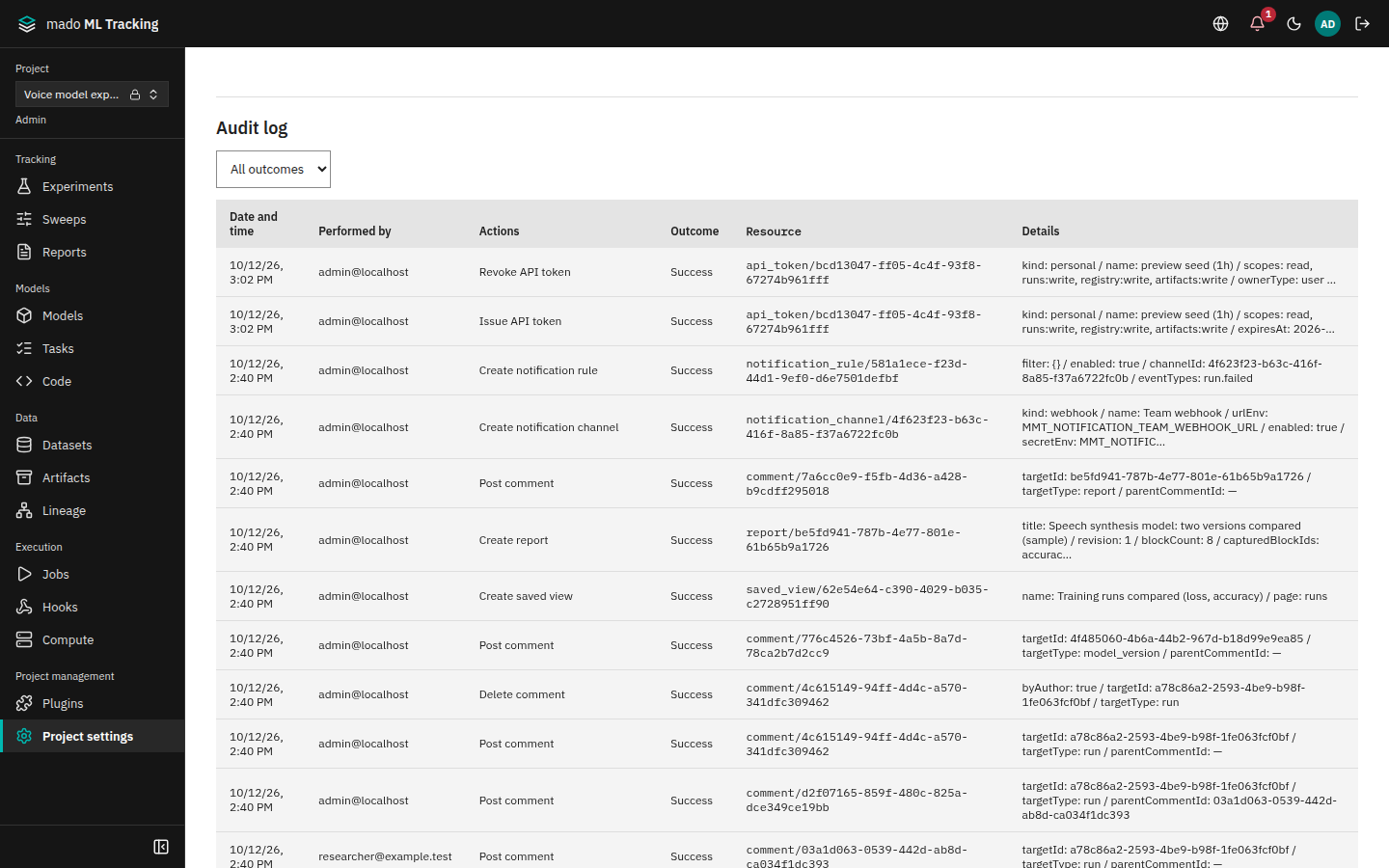
Records are listed newest first. Load older ones with Load more at the bottom.
- All outcomes above the list narrows it to refusals (Denied) or failures (Failed). A refused or failed record is also marked in red next to its action, so it shows in the row on a phone too.
- Administration → Audit log hides sign-ins, sign-outs, and the identity provider's syncs by default. Clear Hide sign-in and sign-out events to show them.
| Column | Content |
|---|---|
| Date and time | When it was recorded |
| Performed by | The display name of the user. Operations with an API token show the token owner's name followed by "(API token)". Records not made by a user, such as failed logins and refused SSO logins, show System |
| Actions | The kind of operation, such as issuing an API token |
| Outcome | Success, Denied, or Failed |
| Resource | The target, such as api_token/<ID> |
| Details | Operation-specific details: roles before and after, scopes, the error code of a refusal, and so on |
What is and is not recorded
- Successful operations are recorded in the same transaction as the operation. If the operation is rolled back, so is the record.
- Operations refused for lack of permission (403) or a conflict (409) are recorded as denied, with
details.code(the API error code). - Invalid input, missing targets, and login attempts refused by the rate limit are not recorded.
- Passwords, token values and hashes, secrets, and notification email addresses are not recorded.
- The source IP address and User-Agent are kept. The IP address is the client that the
MMT_TRUSTED_PROXY_HOPSproxies in front of the API appended toX-Forwarded-For(entries further left can be written by the client and are not read; see Environment variables).
Main actions
| Action | Main details |
|---|---|
auth.login | method (local, oidc, development). Failures have the failure outcome |
auth.logout | |
auth.password.change | |
auth.bootstrap_admin | |
auth.oidc.sync | created, globalRoleBefore / After, groupsAdded / Removed |
auth.oidc.denied | reason, subject, email |
auth.oidc.recheck | reason, scope (session or identity), revokedSessions |
auth.oidc.backchannel_logout | subject, sid, revokedSessions |
admin.user.create, admin.user.update, admin.user.password_reset | Status, administrator flag, and display name before and after |
project.create, project.update, project.archive, project.restore, project.purge | Name, visibility, storage, number of members added at creation, changed fields |
project.member.set, project.member.delete | Role before and after. Members added when a Project is created are also recorded as project.member.set |
project.group_binding.set, project.group_binding.delete | group, role before and after |
token.create, token.revoke | Name, kind, scopes, expiry, owner type |
service_account.create, service_account.update | Role and status before and after |
compute_target.create, compute_target.update | Name, kind, visibility, changed fields. A visibility change also records visibility with from and to. |
compute_target.check, compute_target.directory_listing | The worker asked (workerTokenId, workerId; null for a check that names no worker), checkId or listingId, and path for a directory read. Requests refused for lack of permission have the denied outcome |
storage.backend.create, storage.backend.update, storage.backend.test, storage.settings.update | |
notification.channel.create, update, test | Name, kind, variable names, number of recipients |
notification.rule.create, update | |
artifact.delete, artifact.mlflow_delete | Path, size, storage backend |
automation_rule.owner.transfer, promotion_policy.owner.transfer |
Changes to experiments, models, and datasets, Run descriptions, comments, saved views, reports, sweeps, alias protection, and more are recorded too. A new action without a label on the screen is shown by its raw name.
Read it through the API
The audit log can be read through the API, newest first, up to 200 records per request (50 by default). Pass the response's nextCursor as cursor for the next page.
# Records of a Project (Project Admin; an API token needs the admin scope)
curl -sS -H "Authorization: Bearer $MMT_API_TOKEN" \
"$MMT_API_URL/api/projects/<Project ID>/audit-events?action=token.create&limit=100"| Filter | Example |
|---|---|
action | auth.oidc.denied |
actorUserId | The ID of the user who acted |
outcome | success, denied, failure |
hideSignIns | true leaves out sign-ins, sign-outs, and the identity provider's syncs and rechecks (auth.login, auth.logout, auth.oidc.sync, auth.oidc.recheck) |
projectId (global list only) | A Project ID |
The global records (GET /api/audit-events) can be read by a global administrator signed in from a browser, or with a token a global administrator issued without a Project that holds admin and audit:read (API tokens and Service Accounts). Open the URL in the browser where you are signed in as a global administrator:
https://tracking.example.com/api/audit-events?action=auth.oidc.deniedAdministration → Audit log on the screen has no filters yet. Use this API to filter by action or outcome.