Record with the Python SDK
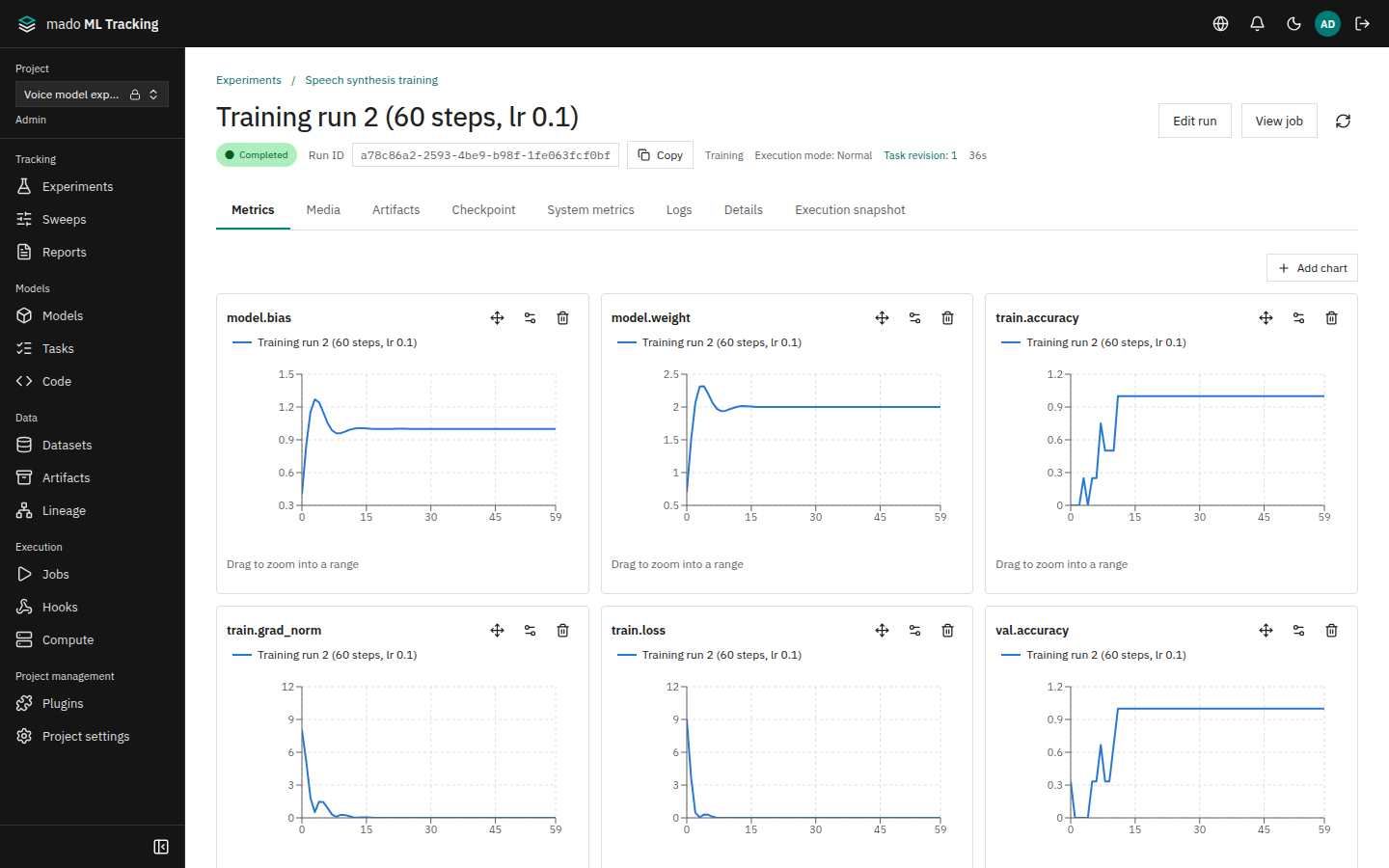
mado-tracking is the Python SDK for recording Runs from training code. Besides params, metrics, and Artifacts, it records GPU and memory usage (system metrics), appends to finished Runs, and records offline on machines that cannot reach the API.
You can also record with the official MLflow 3 SDK (Record from MLflow 3). Keep MLflow if your code already uses it; choose this SDK for system metrics, offline recording, and per-step audio.
When it helps
- Watching loss and GPU utilization on the same page for every training run
- Continuing a stopped training run in the same Run, from the next step
- Training on a machine without access to the internal network and sending the results later
Install
Python 3.11 or later is required. In a terminal on the machine that runs training, create a virtual environment and install the SDK.
Linux and macOS:
python3 -m venv .venv
.venv/bin/python -m pip install \
  'mado-tracking[telemetry] @ git+https://github.com/aida0710/mado-ml-tracking.git#subdirectory=python'
Windows (PowerShell):
py -3 -m venv .venv
.venv\Scripts\python -m pip install `
  "mado-tracking[telemetry] @ git+https://github.com/aida0710/mado-ml-tracking.git#subdirectory=python"
[telemetry] installs psutil and nvidia-ml-py for system metrics. To log numpy arrays or PIL images as audio and images, use [telemetry,media].
Check the installation; a help message starting with usage: mado-tracking means it worked.
.venv/bin/mado-tracking --helpSet the server and token
The SDK reads the server and API token from environment variables. Create a token with Issue API token for this project under Project settings > Connect from SDK or MLflow 3. Recording needs the read and runs:write scopes, plus artifacts:write to upload Artifacts; that button opens the token form with these scopes selected (API tokens).
| Variable | Value | Example |
|---|---|---|
MMT_API_URL | The Web URL (or the URL up to /api) | https://tracking.example.internal |
MMT_API_TOKEN | The API token | The value issued on the page |
MMT_PROJECT_ID | ID of the target Project | The UUID in /projects/<ID>/... URLs |
MMT_EXPERIMENT_ID | ID of the target Experiment | The ID under the Experiment heading |
Enter the token without echoing it, and never put it in source code or files tracked by Git.
export MMT_API_URL='https://tracking.example.internal'
export MMT_PROJECT_ID='PROJECT_ID'
export MMT_EXPERIMENT_ID='EXPERIMENT_ID'
printf 'API token: '; read -r -s MMT_API_TOKEN; echo
export MMT_API_TOKEN
Record a Run
import mado_tracking

with mado_tracking.start_run(name="lr-0.05", parameters={"learning_rate": 0.05, "epochs": 3}) as run:
    run.set_tags({"dataset": "training-v1"})
    for step in range(100):
        loss = train_one_step()
        run.log_metrics({"train.loss": loss}, step=step)
run.log_artifact("model.bin")start_runusesMMT_PROJECT_IDandMMT_EXPERIMENT_ID;project_id=andexperiment_id=override themkind=sets the Run kind (training,finetuning,inference,evaluation,processing); the default istraining- Leaving the
withblock finishes the Run. If an exception is raised, the error goes to the Run's logs and the Run fails - Metric values must be finite. In a new Run, an omitted
stepis recorded as 0 log_artifactsends files of 64 MiB or more in parts; calling it again after an interruption sends only the missing parts. Uselog_artifactsfor a directory
The Run appears in the list when you open its Experiment under Experiments.
Inside a worker Job, start_run does not create a Run; it records into the Run assigned to the Job.
Record system metrics
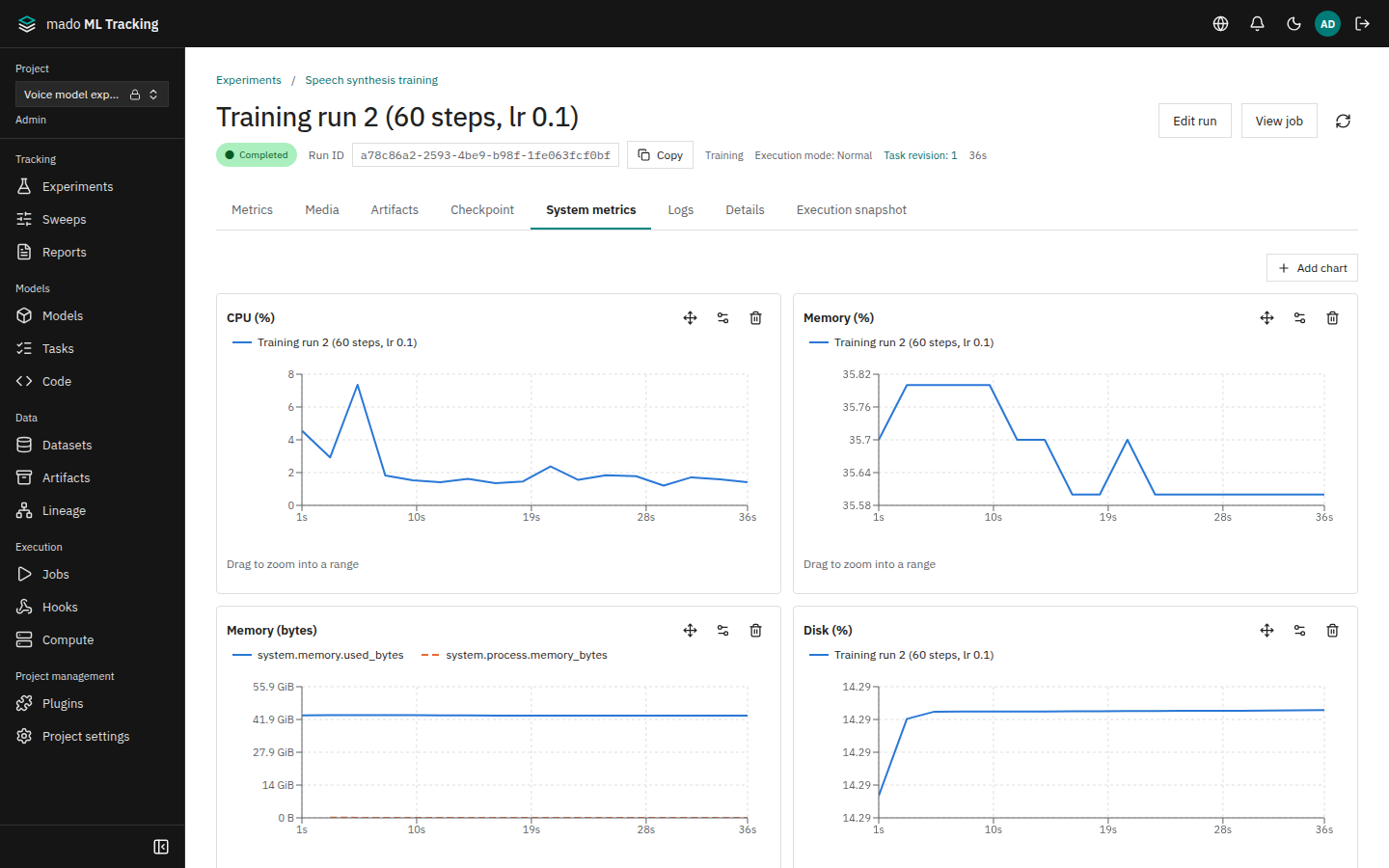
system_metrics=True records CPU, memory, disk, network, and GPU usage at a fixed interval.
with mado_tracking.start_run(name="lr-0.05", system_metrics=True, system_metrics_interval=15) as run:
...- The default interval is 15 seconds; the minimum is 1 second
- Names start with
system., such assystem.cpu.percent,system.memory.used_bytes, andsystem.gpu.0.utilization_percent. The Run's System metrics tab draws them by category - Only GPUs visible through
CUDA_VISIBLE_DEVICESare recorded. Items withoutpsutilor the NVIDIA driver are skipped MMT_SYSTEM_METRICS=falseturns recording off even when the code asks for it- Inside a worker Job the collector does not start, because the worker records the same items
Recording is off by default, like MLflow and unlike W&B.
Continue a finished Run
To continue stopped training in the same Run, pass run_id and resume.
run = mado_tracking.start_run(run_id="RUN_ID", resume="must")
run.log_metrics({"train.loss": 0.12})   # recorded at the previous maximum step + 1
run.finish()
resume | Behavior |
|---|---|
"never" (default) | Always creates a new Run. Passing only run_id is an error |
"must" | Reopens an existing Run; fails when it does not exist |
"allow" | Reopens the Run, or creates one with that ID (needs experiment_id and name) |
- In a resumed Run, an omitted
stepcontinues from each key's previous maximum step + 1.run.last_step("train.loss")reads the current maximum - Every resume is recorded: charts show a Resume marker, and the Run details list the execution segments (first run, resume 1, resume 2, ...)
- Runs executed by a worker Job cannot be resumed. Continue them from a checkpoint as a new Run (Resume training)
- System metric steps restart at 0 after each resume, so they overlap the previous segment
Record offline and sync later
On machines that cannot reach the API, record locally and send the records from a machine that can.
with mado_tracking.start_run(
    project_id="PROJECT_ID", experiment_id="EXPERIMENT_ID", name="offline-run",
    mode="offline", system_metrics=True,
) as run:
    run.log_metrics({"train.loss": 0.5}, step=1)
    run.log_artifact("model.bin")
The MMT_MODE environment variable works instead of mode.
| Mode | Behavior |
|---|---|
online (default) | Records to the API |
offline | Never contacts the API and records locally. MMT_API_URL and MMT_API_TOKEN are not needed |
auto | Records to the API and switches that Run to local recording if the API becomes unreachable |
Records are kept per Run under MMT_OFFLINE_DIR (default ~/.local/share/mado-tracking/offline). Tokens are never written there. Artifacts are copied into the folder by default, so you can move the whole folder to another machine and send it from there.
On a machine that can reach the API, set the server and token, then run sync. The token needs runs:write and artifacts:write.
mado-tracking sync --dry-run          # show what would be sent (no API access)
mado-tracking sync                    # send every Run under MMT_OFFLINE_DIR
mado-tracking sync /path/to/offline   # send the Runs in a specific folder
mado-tracking sync --project-id PROJECT_ID --prune # send one Project's Runs and delete them locally once sent- If a sync fails, run it again to continue where it stopped. Sending the same records twice does not duplicate Runs or metrics
- Runs that are still being recorded are skipped. Runs without an end status are sent but stay running
- The exit code is 1 when any Run could not be sent
Model and dataset registration, checkpoints, and Run resume are not available offline.
Related features
- Per-step audio, images, and tables: Media Logging and Listening
- Reading trial params with
trial_parameters: Sweeps - All commands: CLI