Notifications and operations alerts
Run failures, automation failures, stale Job heartbeats, stopped workers, and stalled plugin deliveries can be sent to Slack, webhooks, and email.
There are two roles.
| Setting | Who | Where |
|---|---|---|
| Notification channels (where to send) | Global administrators | Notifications → Notification channels in Project settings |
| Notification rules (which events go to which channel) | Project Admins | Notifications → Notification rules in Project settings |
Events
| Event | Sent when |
|---|---|
| Run failed | A Run ended as failed |
| Run canceled | A Run ended as canceled |
| Run completed | A Run finished (only if the rule selects it) |
| Automation failed | Automation after a model registration failed to start |
| Job heartbeat lost | A running Job's heartbeat is older than 60 seconds |
| Job heartbeat recovered | A stale Job's heartbeat came back |
| Worker stopped | A worker's last response is older than 120 seconds |
| Plugin delivery backlog | An undelivered plugin event is older than 15 minutes, or one event failed 5 or more times |
1. Put URLs and secrets in environment variables
Webhook URLs and signing keys are never stored in the database or shown on screens. Put the values in the API server's environment and register only the variable names in the channel. Names must start with MMT_NOTIFICATION_ and use only uppercase letters, digits, and _.
# API server .env. Do not paste values into repositories or chats
MMT_NOTIFICATION_SLACK_URL=https://hooks.slack.com/services/...
MMT_NOTIFICATION_OPS_URL=https://ops.example.com/hooks/mmt
MMT_NOTIFICATION_OPS_SECRET=<value generated by the command below>
Generate a webhook signing key in a terminal:
openssl rand -hex 32Restart the API after changing environment variables.
Email
Email is sent only when the API server has both of these:
# smtp://...:587 for STARTTLS, smtps://...:465 for TLS from the start
MMT_SMTP_URL=smtps://<user>:<password>@smtp.example.com:465
MMT_SMTP_FROM=mado ML Tracking <mmt@example.com>- URL-encode symbols in the user and password. A query (
?...) is not accepted. - Setting only one of them, or a malformed value, stops the API from starting. The error shows only the variable name.
- TLS certificates are always verified. For an SMTP server with an internal CA certificate, set the API server's
NODE_EXTRA_CA_CERTSto the path of the CA's PEM file.
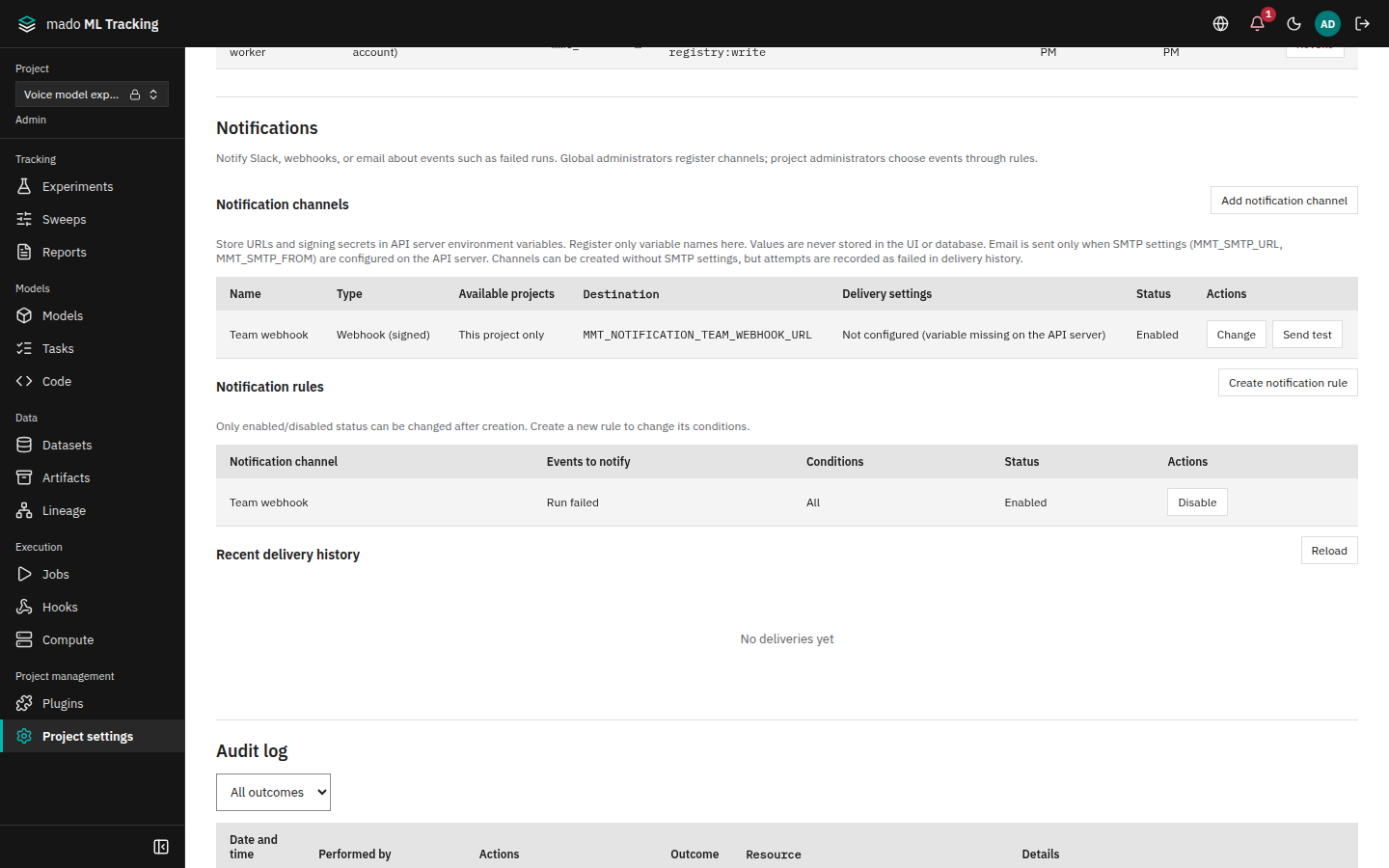
2. Add a channel (global administrators)
- Open Project settings and click Add notification channel under Notification channels.
- Choose the Type, enter its values, and save. A variable name field offers the API server's variables that start with
MMT_NOTIFICATION_and hold a value (values are never shown). A name the API server does not have is flagged before saving; the channel can still be saved, but it cannot send.
| Type | Fields | Example |
|---|---|---|
| Slack (Incoming Webhook) | Environment variable containing the URL (starts with MMT_NOTIFICATION_) | MMT_NOTIFICATION_SLACK_URL |
| Webhook (signed) | Environment variable containing the URL (starts with MMT_NOTIFICATION_) and Environment variable containing the signing secret (starts with MMT_NOTIFICATION_) | MMT_NOTIFICATION_OPS_URL, MMT_NOTIFICATION_OPS_SECRET |
| Recipient email addresses (one per line), up to 50 | ml-team@example.com |
With Available projects set to All projects, rules in other Projects can use the channel too; with This project only, only this Project's rules can.
- Check that Delivery settings in the list shows Configured. Not configured (variable missing on the API server) means the API process cannot see the variable; for email, Not configured (SMTP delivery settings missing) means there are no SMTP settings. Saving a channel that is not configured says so right after saving as well.
- Click Send test, and check that the screen shows "Test notification delivered" and the message arrives.
Test messages are not kept in the delivery history. The result is recorded in the audit log as notification.channel.test.
3. Create a rule (Project Admins)
Without any channel, Create notification rule is disabled and the screen asks you to have a global administrator add one; only global administrators add and change channels.
- Click Create notification rule under Notification rules.
- Choose the following and save. A channel without its server settings is marked not configured in the choices, and choosing it warns that the rule will not deliver.
| Field | Choose |
|---|---|
| Notification channel | A channel registered above |
| Events to notify | Check one or more, for example Run failed, Automation failed, Worker stopped |
| Run kinds (none selected means all) | Check Training, Inference, Evaluation, and so on. None checked means all |
| Experiments (none selected means all) | Check experiments. None checked means all |
| Only runs launched by automation | Select to notify only about automation Runs |
The conditions of a rule cannot be changed after creation. To change them, create a new rule and stop the old one with Disable.
Rules with Run kind or experiment conditions do not receive Worker stopped and Plugin delivery backlog, because those events have no Run. Use a rule without conditions for operations notifications.
What is sent
| Kind | Content |
|---|---|
| Slack | Title, Project, Run, experiment, kind and status, the first 500 characters of the error |
| Webhook | The event as JSON, with the headers X-MMT-Event, X-MMT-Event-Id, X-MMT-Delivery, and X-MMT-Signature: sha256=<HMAC-SHA256(key, body)> |
Subject [<Project name>] <title>; the body is plain text with the same items as Slack (the first 2000 characters of the error) |
Receivers should verify X-MMT-Signature against the exact body bytes and remove duplicates with X-MMT-Event-Id. An event has the same ID whichever rule sends it.
No notification contains execution settings, parameters, environment variables, or tokens.
Delivery and failures
- When a Run ends, one delivery is queued for each enabled rule whose conditions match. The same event of the same Run is sent only once.
- The API picks up deliveries every second. HTTP sends time out after 5 seconds, email after 10 seconds. Redirects are not followed.
- A failed delivery is retried with intervals doubling from 5 seconds (up to 1 hour), and marked failed after 8 attempts (about 10 minutes), because old notifications lose their value.
- Deliveries whose channel or rule was disabled while queued are marked failed without sending. Re-enabling does not send old notifications in bulk.
Project Admins can check the Status, Attempts, and Failure reason in Recent delivery history.
| Failure reason | Check |
|---|---|
| The URL or signing secret environment variable referenced by this channel is not set on the API server | The variable name and value in .env, and whether the API was restarted |
| The destination returned HTTP 4xx / 5xx | The webhook URL and the receiver's state |
| Could not connect to the destination | Network access from the API server, certificates |
| The destination did not respond in time | Whether the receiver responds within 5 seconds |
| SMTP authentication failed | The user and password in MMT_SMTP_URL |
| TLS connection to the SMTP server failed | The port and the smtp:// / smtps:// combination |
Operations alerts
Every 30 seconds the API server checks for stale Job heartbeats, stopped workers, and stalled plugin deliveries. When it finds one, it shows the count as Operations alerts under the bell in the top bar and notifies the channels selected by rules, once.
The bell counts the alerts of every Project you are a member of (every Project for a global administrator). Anyone can open a public Project, but its alerts are not on your bell unless you are a member. Each alert names its Project, and the open Project's alerts come first. The bell is on the Global settings screens too, so a worker that stopped in another Project shows before you open that Project. The bell reads up to 200 alerts at a time and shows "200+" beyond that.
| Kind | Opens when | Closes when |
|---|---|---|
| Job heartbeat lost | A running Job's heartbeat is older than 60 seconds | The heartbeat returns (Job heartbeat recovered is sent) or the Job ends |
| Worker stopped | A worker's last response is older than 120 seconds | The worker responds again, its token is revoked or expired, or it has not responded for 7 days |
| Plugin delivery backlog | The oldest undelivered event is older than 15 minutes, or one failed 5 or more times | Undelivered events fall below the condition, or the integration is disabled |
- A stale heartbeat does not fail the Job, because the worker may still be working. Request a stop for a stuck Job in Jobs, or check the worker host.
- Mado delivery status is under Event delivery status in Integrations. After fixing Mado or the connection settings, click Resend event (Mado integration).
- The thresholds are constants in the code and cannot be changed with environment variables.