API tokens and Service Accounts
The SDK, MLflow, workers, and CI authenticate to the API with API tokens. There are three kinds.
| Kind | Owner | Where it is issued | Good for |
|---|---|---|---|
| Personal API token | The signed-in user | My API tokens in Account or Project settings, or Connect from SDK or MLflow 3 | Recording Runs from your own PC or notebook |
| Service Account token | A Service Account (not tied to a person) | Service accounts in Project settings | Long-running workers, automation, CI |
| Job token | The creator of the Run | Workers receive one automatically for each Job | Recording to the Run from the running code. Nobody issues these by hand |
The token value is shown only once, when it is issued. The database keeps only a hash and the first 16 characters (mado_mt_ and the next 8), and no list shows the value.
Scopes
Scopes decide what a token can do. Scopes beyond the owner's Project role cannot be selected.
| Scope | Allows | Role the owner needs |
|---|---|---|
read | Reading | Viewer |
runs:write | Creating and recording Runs | Editor |
registry:write | Registering models and datasets | Editor |
artifacts:write | Saving Artifacts | Editor |
jobs:write | Starting and canceling Jobs | Editor |
worker:execute | Running Jobs as a worker | Admin |
admin | Managing the Project. Includes every other scope except the three below | Admin |
tokens:manage | Issuing and managing tokens and Service Accounts within this token's own grant | Viewer (Admin for Service Accounts) |
audit:read | Reading the global audit log | Global administrator (a token without a Project) |
users:manage | Managing users | Global administrator (a token without a Project) |
admin does not include tokens:manage, audit:read or users:manage. Only a token that names them holds them.
Besides the scopes, every token request checks the owner's current effective role. If the owner is removed from the Project or loses a role, the affected operations return 403 even without revoking the token.
Manage tokens from a token
A token with tokens:manage can issue and revoke tokens through the API, and create and change Service Accounts and issue their tokens. It handles only tokens within its own grant.
| Rule | When broken |
|---|---|
Only scopes it holds itself (even with admin, tokens:manage, audit:read and users:manage only when it holds them) | 403 token_authority_exceeded |
| A token limited to a Project handles only tokens of the same Project | 403 project_forbidden |
| No token that stays valid after its own expiry, including no expiry and an omitted expiry that defaults to 365 days | 403 token_outlives_issuer |
Revoking follows the same rules: a token cannot revoke a stronger one. A token it issues is owned by the calling token's owner, and the audit log records the calling token.
Only a token a global administrator issues without a Project can hold audit:read and users:manage (otherwise 422 global_scope_requires_unrestricted_token). The screen issues only Project tokens, so issue these two through the API. admin with users:manage reads the user list; creating and changing users and issuing temporary passwords need every scope (admin, tokens:manage, audit:read and users:manage).
Changing your own password, your own settings on a computer, and purging an archived Project work only in the browser.
Expiry
Choose 7, 30, 90 (default), or 365 days, Never expires, Custom duration, or Choose from calendar. A custom duration accepts minutes, hours, or days, including fractional values and durations longer than 365 days. The calendar selects a date and time in the browser's timezone, shown below the field. These options apply to personal and service account tokens.
In the API, expiresAt: null means no expiry. Any future timestamp is accepted without a lifetime cap. Omitting the field uses MMT_TOKEN_DEFAULT_LIFETIME_DAYS (365 days by default). Past or invalid timestamps return 422 invalid_expiry.
An expired token returns 401. Issue a new token and replace the old one before it expires.
Issue a personal API token
- Open Account from the user menu and click Issue API token at the top right of My API tokens. Choose the Project and click Next. You can also issue a token from the same button in Project settings.
- Enter a name, choose the purpose and expiry, and click Save. Choosing a purpose checks the scopes it needs. Changing a scope's checkbox moves the purpose to Choose scopes manually.
| Field | Example |
|---|---|
| Name | laptop-notebook (a name that says where it is used) |
| Purpose | Record from SDK or MLflow 3 to record Runs (the default: read, runs:write, registry:write, artifacts:write) |
| Expires at | 90 days |
The purposes on offer are below. A purpose that needs a scope above the owner's role is not shown.
| Purpose | Scopes |
|---|---|
| Record from SDK or MLflow 3 | read, runs:write, registry:write, artifacts:write |
| Submit jobs from the command line | read, jobs:write |
| Run jobs as a worker (Service Accounts only) | read, worker:execute, artifacts:write |
| Read only | read |
| Choose scopes manually | The checked ones |
Besides recording, a token for Record from SDK or MLflow 3 can delete dataset versions that nothing uses, and a Project admin's token can delete Artifacts as well (on the same conditions as on the screen).
- Click Copy token and store the token somewhere safe. It is never shown again after you close the dialog.
Tokens issued on the screen are limited to that Project. Issue API token for this project in Connect from SDK or MLflow 3, on Project settings or under Record with SDK on the experiment page, opens the same dialog.
The Configuration example in the dialog holds the environment variables for the Python SDK and MLflow 3 together, without the token. Copy it with Copy example and paste it into a terminal; it asks for API token:, where you paste the token you copied.
In a terminal, type the token into an environment variable instead of writing it in command arguments or files. The example works in both bash and zsh (the macOS default):
export MMT_API_URL=https://tracking.example.com
printf 'API token: '; read -r -s MMT_API_TOKEN; echo
export MMT_API_TOKEN
Check that the token works with the following command. It prints the token's scopes and Project.
curl -sS -H "Authorization: Bearer $MMT_API_TOKEN" "$MMT_API_URL/api/auth/token"SSO users' tokens stop after 7 days
Tokens of users who sign in with SSO stop with 401 identity_sync_required when 7 days (OIDC_TOKEN_SYNC_MAX_AGE_SECONDS) have passed since the last browser login. This is how removal from an Authentik group is noticed. Signing in once in a browser makes the same tokens work again (Authentik (SSO)).
Service Accounts
A Service Account is an account that belongs to one Project and to no person. Its tokens keep working when the person who issued them leaves the Project, and the 7-day limit for SSO users does not apply.
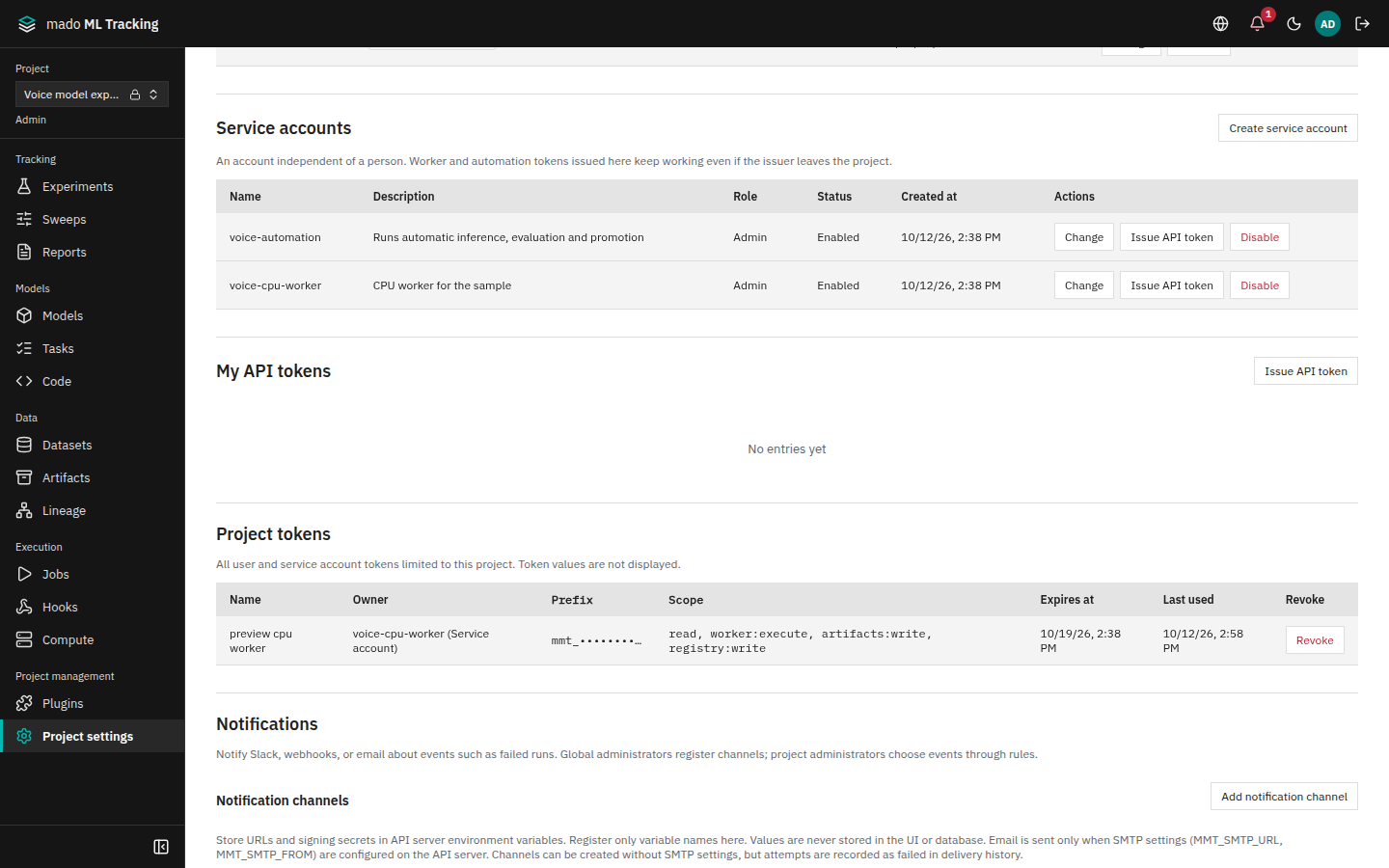
Create a Service Account
A Project Admin does this. Through the API, a token with tokens:manage can do it too (see Manage tokens from a token above).
- Click Create service account under Service accounts in Project settings.
- Enter the following and save.
| Field | Example |
|---|---|
| Name | gpu-host-1-worker (unique in the Project, up to 200 characters) |
| Description | Worker on GPU server 1 |
| Role | Admin for a worker or an automation owner, Viewer for read-only CI |
- Click Issue API token on the new row, choose a name, purpose, and expiry, and save. For a Service Account with the Admin role, the purpose starts at Run jobs as a worker. Note the token that is shown.
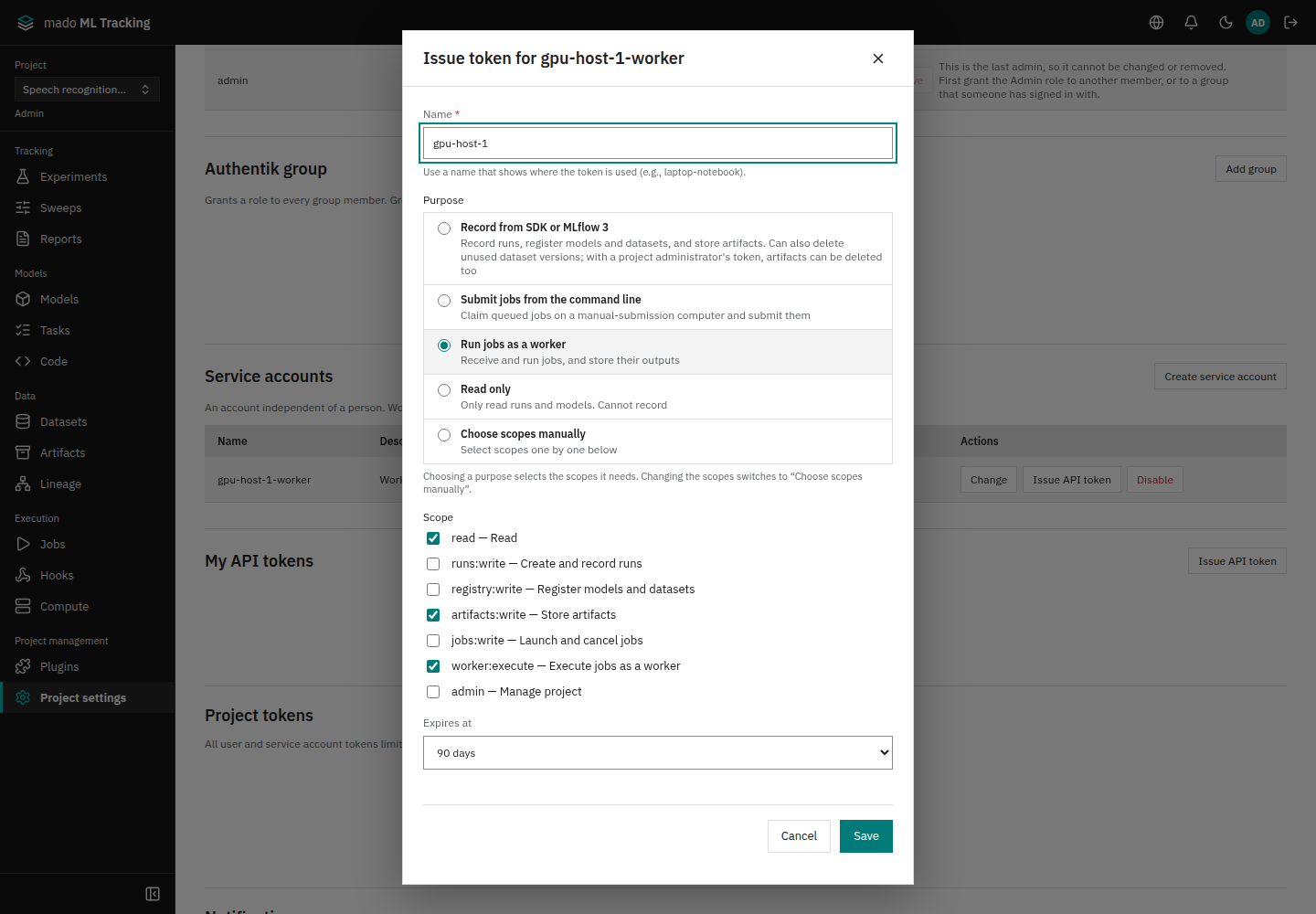
Only scopes up to the Service Account's role can be chosen. worker:execute can be issued only to Service Accounts with the Admin role.
Typical scopes by use:
| Use | Role | Scopes |
|---|---|---|
| Worker | Admin | read, worker:execute, artifacts:write; add registry:write to register output models and datasets |
| Owner of automation rules and promotion policies | Admin | No token needed (ownership is only transferred) |
| Recording Runs from CI | Editor | read, runs:write, artifacts:write |
See Worker for installing a worker, and Automation for transferring automation rule ownership to a Service Account.
Stop or change
- Stop temporarily: click Disable on the row. All tokens of the Service Account return 401 from the next request. Enable makes the same tokens work again.
- Change the role: choose a new role with Change. After lowering the role, operations above the new role return 403.
- Stop one token: revoke it in Project tokens below.
Service Accounts also appear in Administration → Users as Service account, but they cannot sign in and cannot be made global administrators.
Revoke a token
- Your own tokens: click Revoke under My API tokens in Project settings, or under the same heading on the Account page.
- Project tokens: in Project tokens, a Project Admin sees the tokens of every user and Service Account limited to the Project, and can revoke them with Revoke. The list shows the owner, the first 16 characters, scopes, expiry, and last use (updated every 5 minutes).
A revoked token returns 401 from the next request and cannot be restored. Issuing and revoking are recorded in the audit log as token.create and token.revoke.
While a Project is archived, tokens limited to it (including those of Service Accounts) return 401 until it is restored. When a Project is deleted permanently, its tokens are revoked and its Service Accounts are disabled (Create and manage Projects).
Job tokens
For each Job, the worker receives a token valid only for that Job (starting with mado_mtj_) and passes it to the running code as MMT_API_TOKEN and MLFLOW_TRACKING_TOKEN. The worker's own token is never passed to the code. Nobody issues or manages Job tokens by hand.
- Permissions follow the Run creator's current effective role. The scopes are
read,runs:write,artifacts:write, andregistry:write. - The token can write only to the target Run (metrics, params, tags, logs, input datasets, Artifacts), model and dataset versions whose source is that Run, the Run's Logged Models, and the creation of the output Model. Writing to other Runs in the Project, issuing tokens, Project settings, and automation rules return 403
job_token_forbidden. - It can read anything in the same Project, for example to fetch an upstream Run's Artifacts.
- When the Job ends (finished, failed, or canceled), the token returns 401.
See Worker for using it from the running code.
MLflow Basic authentication
For tools that only accept a username and password, the MLflow-compatible API (/api/mlflow/...) also accepts Basic authentication. Put the API token in the password; the username may be empty. Local account passwords are not accepted.
export MLFLOW_TRACKING_USERNAME=token
printf 'API token: '; read -r -s MLFLOW_TRACKING_PASSWORD; echo
export MLFLOW_TRACKING_PASSWORD
Basic authentication to the native API returns 401 basic_auth_unsupported. See Recording from MLflow 3 for the MLflow connection.