Sweeps (Hyperparameter Search)
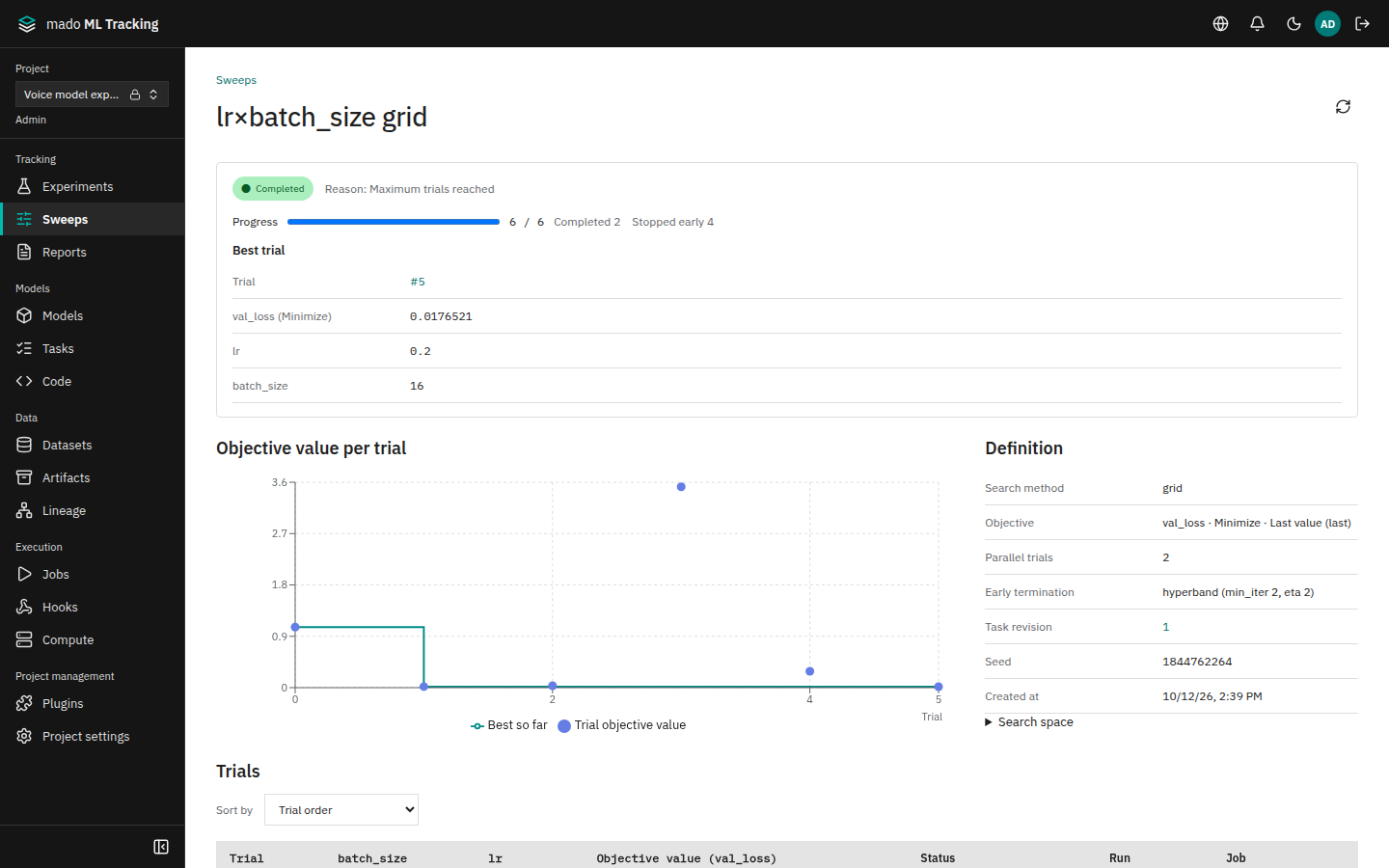
A Sweep picks combinations of params from a search space, repeats training, and finds the combination with the best target metric. Trials enter the Compute target queue as Task executions and workers run them in turn. The configuration follows the W&B sweep config (method, metric, parameters, early_terminate).
When it helps
- Trying every combination of learning rate and batch size
- Fixing the number of trials and narrowing in on a promising range automatically
- Stopping unpromising trials early to free the machines for the next ones
Before you start
- You need a Task that runs the training code. The Task's params are the defaults for every trial (Tasks and code)
- Creating a Sweep needs the editor role or higher in the Project
- The training code records the target metric with a step. For early stopping, use a progress measure such as the epoch as the step
Read trial params in the training code
A trial's params are the Task's params overridden by the trial's values. Read them with trial_parameters in the Python SDK.
import mado_tracking
from mado_tracking import trial_parameters

parameters = trial_parameters({"lr": 0.05, "batch_size": 4})
lr = float(parameters["lr"])
batch_size = int(parameters["batch_size"])

with mado_tracking.start_run() as run:
    for epoch in range(10):
        val_loss = train_one_epoch(lr, batch_size)
run.log_metrics({"val_loss": val_loss}, step=epoch)- Outside a worker it returns the defaults you passed, so the same script runs locally
- Values keep their JSON types; convert with
float()and so on where numbers are needed - Without the SDK, read the
MMT_PARAMETERS_JSONenvironment variable (a JSON string) or the fileMMT_PARAMETERS_FILEpoints to
Create a Sweep
Open Sweeps in the left sidebar, press Create sweep at the top right, and fill in:
| Item | Value |
|---|---|
| Task | The training Task. Its current revision number is pinned |
| Computer | Only computers that can use the runtime of the Task's code version are offered. Left empty (Task default (<computer name>)), trials run on the Task's computer |
| GPUs (task default if none selected) | Check GPUs of the chosen computer (the Task's computer when empty). Without a choice the Task's default GPUs are used. If you chose another computer that lacks the Task's GPUs, the dialog says so; choose its GPUs instead (the Sweep cannot be created as it is). On a site there is nothing to check; the Task's GPU count is used |
| Search method | grid, random, or bayes |
| Objective metric and Direction | For example, minimize val_loss. Suggestions come from metrics recorded by the Task's past Runs |
| Trial value aggregation | Last value (last) (default), Minimum value (min), or Maximum value (max) |
| Maximum trials | 1 to 10,000 |
| Parallel trials | Trials queued or running at once, 1 to 100 |
| Seed (blank lets the server choose) | With the same seed, random picks the same values |
| Early termination | None or Hyperband (min_iter, eta, max_iter) |
| Search space | See below |
Enter the search space per param with Edit rows, or paste a config into W&B JSON and choose Load.
| Kind | Input | Example |
|---|---|---|
| Values | Comma-separated values. Quote a value like "32" to keep it a string | 16, 32, 64 |
| Constant | One value | 10 |
| Range | A distribution (uniform, log_uniform, int_uniform, q_uniform) with min and max | log_uniform 0.00001 to 0.01 |
The min and max of log_uniform are the values themselves, which matches W&B's log_uniform_values, not W&B's log_uniform (which takes exponents). Up to 50 params are allowed.
A W&B-style config:
{
  "method": "bayes",
  "metric": { "name": "val_loss", "goal": "minimize" },
  "parameters": {
    "lr": { "distribution": "log_uniform_values", "min": 0.00001, "max": 0.01 },
    "batch_size": { "values": [16, 32, 64] }
  },
  "early_terminate": { "type": "hyperband", "min_iter": 1, "eta": 3 },
  "run_cap": 30,
  "parallelism": 4
}
run_cap (max trials) is required. Unsupported keys such as program or command are errors, because silently ignoring them would run a different search than the one written. The name is entered on the page, and the Task decides which code runs.
With grid, when there are fewer combinations than max trials, the form says so, for example "The grid has 6 combinations. The sweep ends after 6 trials."
The first trial is queued as soon as the Sweep is created. Trial Runs are created in the Task's Experiment as <Sweep name>-<trial number>.
Python can create Sweeps too:
from mado_tracking import Client
from mado_tracking.sweeps import SweepsClient

with Client() as client:
    sweeps = SweepsClient(client)
    sweep = sweeps.create_sweep("PROJECT_ID", task_id="TASK_ID", name="lr-search", config={...})
    print(sweeps.best_trial("PROJECT_ID", sweep["id"]))
Methods
| Method | How it picks | Good for |
|---|---|---|
| grid | Tries every combination of values and constants in order. Ranges are not allowed. Up to 10,000 combinations, counted while you type | A few candidates you want to try exhaustively |
| random | Picks at random from the search space | A wide space where you first want the overall trend |
| bayes | TPE (Tree-structured Parzen Estimator) picks values close to good trials. Until 10 trials have finished it behaves like random | Getting close to good values with fewer trials |
Early stopping
With Hyperband, running trials are compared every 15 seconds and unpromising ones are stopped.
- At steps min_iter × eta^k (for example 1, 3, 9, ...), the target metric of every trial that reached the step is compared
- Trials outside the top 1/eta are stopped. Nothing is stopped while fewer than eta trials have reached the step
- Stopped trials become Stopped early. The worker stops the Run, and the Run list also shows Stopped early to tell it apart from Runs stopped by a person. The freed slot gets the next trial right away
- The value at the time of stopping is recorded and still counts as a candidate for the best trial
Parallelism and machine limits
Parallelism caps how many trials the Sweep puts in the queue at once. How many actually run is also limited by the Compute target's concurrent Job limit and free GPUs: with parallelism 8 and a target limit of 2, two run and the rest wait. If the target is shared with other Jobs, keep parallelism at or below the target's limit so the Sweep does not push other Jobs back.
View trials
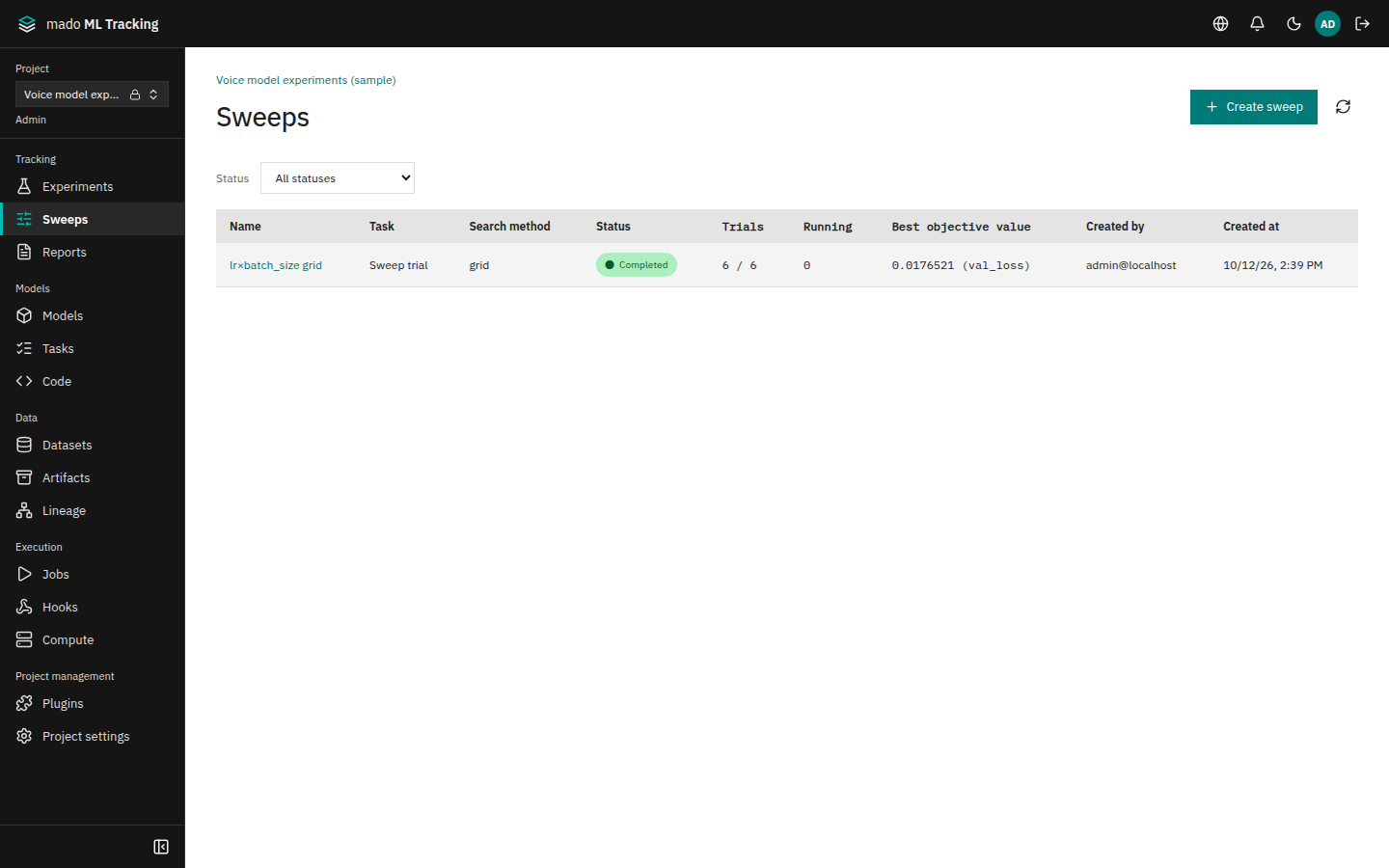
The Sweeps list shows the status, trials created against the limit, running trials, and the best objective value. Select a Sweep to open its details:
- Status and reason, progress (counts per state). When a grid has fewer combinations than max trials, the progress counts against the number of combinations and says it ends before reaching max trials
- Best trial: the best objective among finished and early-stopped trials; ties go to the smaller trial number
- Objective value per trial and a Best so far step line
- Definition: method, objective, parallelism, early stopping, Task revision, seed, search space
- Trials table: param columns, objective value, state, links to the Run and Job. Sort by Trial order or Best objective first
- An overlay of the trials' target metric (latest 200 trials)
- Result analysis (parallel coordinates, parameter importance, scatter plot)
While trials are running, the page refreshes every 5 seconds.
When trials are waiting but no worker takes the computer they run on (the Sweep's computer, or the Task's when empty), or its workers stopped answering, the details show a warning such as "No worker is assigned to “gpu-1”." with Open worker setup. The Sweep itself stays running, so check here when trials do not move (When a queued Job does not start).
Trial Jobs show Sweep: <Sweep name> #<trial number> in the Launch source column of Jobs, which links to the Sweep.
Pause or change a Sweep
The creator (editor or higher) and Project admins can use these on the details page:
- Pause and Resume: stop and restart queuing new trials
- Cancel sweep: stop queuing and stop waiting trials. Checking Also request stopping running trials stops running trials too
- Change maximum trials and parallelism: max trials cannot go below the number of trials already created
The definition (method, search space, and so on) cannot be changed; create a new Sweep instead.
A Sweep pauses itself in these cases:
| Reason | What to do |
|---|---|
| The Task was edited | It stops so it does not continue under different conditions. It cannot be resumed; create a new Sweep |
| The creator is no longer an editor of the Project | Restore the creator's role, then resume |
| A Job could not be created (for example, the target was disabled) | Fix the cause, then resume |
Runs created by manually retrying a trial's Job do not count as Sweep trials.