Record from MLflow 3
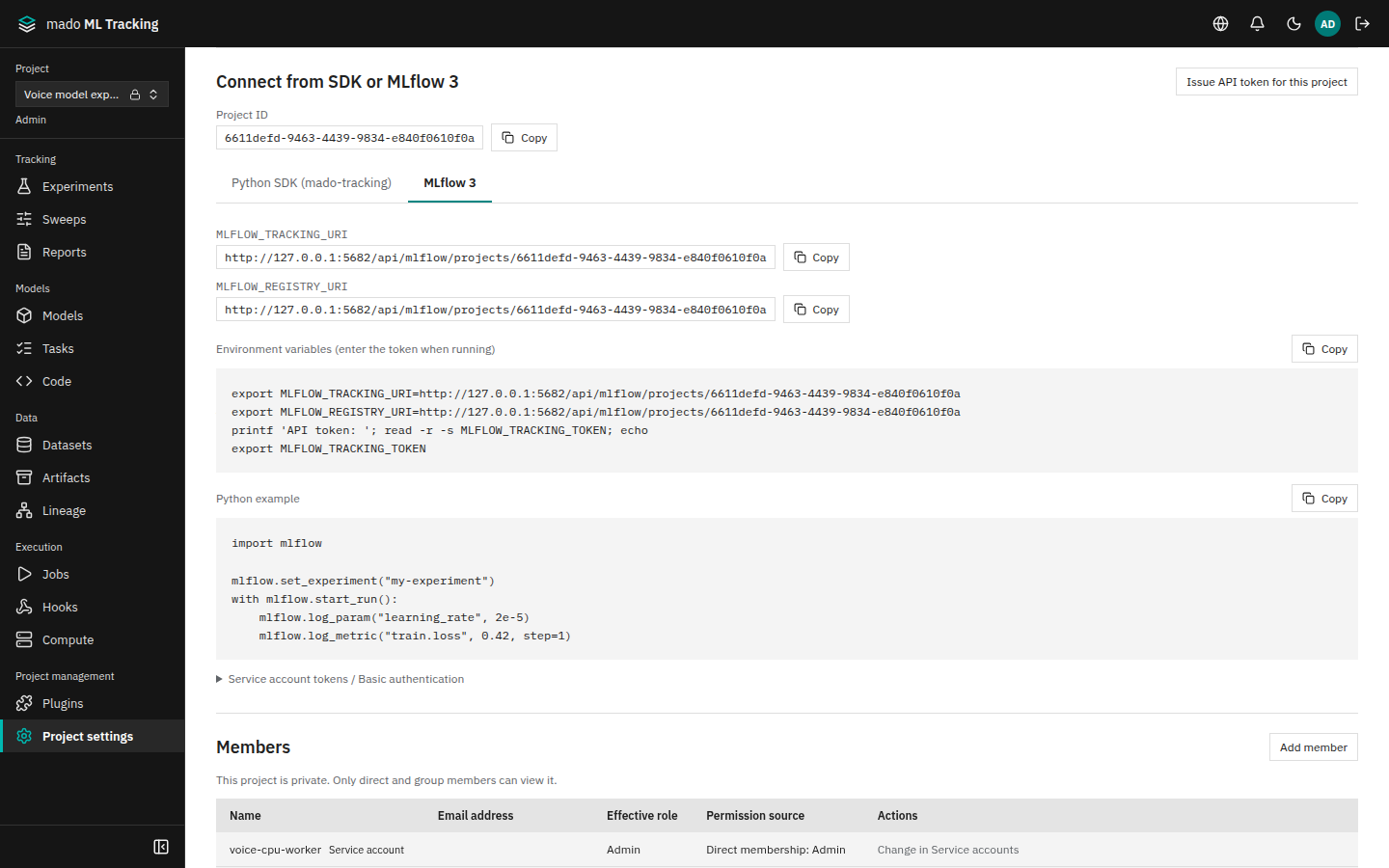
The official mlflow Python SDK (MLflow 3) can record into a mado ML Tracking Project. Set the server and token in environment variables and keep your MLflow code as it is. Runs, metrics, Artifacts, and registered models recorded this way are the same data as those recorded from the Web UI.
This is not a server with every MLflow feature. Check the supported features table.
When it helps
- Sending existing MLflow training code to the in-house server without changes
- Using automatic logging such as
mlflow.sklearn.autolog() - Connecting models registered with
mlflow.register_model()to automatic inference and evaluation
Connect
- Open Project settings and find Connect from SDK or MLflow 3.
MLFLOW_TRACKING_URIandMLFLOW_REGISTRY_URIshow the same URL,https://<server>/api/mlflow/projects/<Project ID> - Choose Issue API token for this project. The token form opens with
read,runs:write,registry:write, andartifacts:writeselected; enter a name and expiry and issue it. The token is shown only once, so keep it (the button is shown to editors and above) - In a terminal on the training machine, install MLflow and set the environment variables
python3 -m pip install 'mlflow>=3,<4'
export MLFLOW_TRACKING_URI='https://tracking.example.internal/api/mlflow/projects/PROJECT_ID'
export MLFLOW_REGISTRY_URI="$MLFLOW_TRACKING_URI"
printf 'API token: '; read -r -s MLFLOW_TRACKING_TOKEN; echo
export MLFLOW_TRACKING_TOKEN
The Copy button next to the environment variable example copies these lines with the Project's URL. Never put the token in source code or Git-tracked files; pass it to containers as an environment variable.
| Purpose | Scope |
|---|---|
| Read Experiments, Runs, models, and Artifacts | read |
| Record Experiments, Runs, params, metrics, and tags | runs:write |
| Register a new input Dataset | runs:write and registry:write |
| Upload Artifacts | artifacts:write |
| Register or change Logged Models, model versions, and aliases | registry:write |
The recording user needs the editor role or higher in the Project. For workers and other long-running automation, use a Service Account token rather than a personal one: tokens of SSO users stop working seven days after their groups were last checked (API tokens).
Check the connection
Run the following; if an Experiment connection-check with one Run appears under Experiments, the connection works.
import mlflow

mlflow.set_experiment("connection-check")
with mlflow.start_run(run_name="hello"):
    mlflow.log_param("learning_rate", 0.01)
    mlflow.log_metric("loss", 0.5, step=1)
When it fails, the error message says what to fix.
| Error | What to fix |
|---|---|
ENDPOINT_NOT_FOUND: MLFLOW_TRACKING_URI does not contain a project ID | Do not stop MLFLOW_TRACKING_URI at the site or at /api/mlflow; include /api/mlflow/projects/<Project ID> |
UNAUTHENTICATED: no API token was sent | Put the token in MLFLOW_TRACKING_TOKEN (MLFLOW_TRACKING_PASSWORD for Basic authentication) |
UNAUTHENTICATED (the token is invalid or revoked) | Check the token's value and expiry, and issue a new one if needed |
PERMISSION_DENIED: the API token lacks the scope ... | The message names the missing scope. Issue a token with the purpose Record from SDK or MLflow 3 |
PERMISSION_DENIED: the API token belongs to project ... | The message names the token's Project. Match the Project ID in the URI or the token you use |
Connect with Basic authentication
Internal tools that only accept a user name and password can use Basic authentication. Put the API token in the password. The user name is not checked, so any value works.
export MLFLOW_TRACKING_URI='https://tracking.example.internal/api/mlflow/projects/PROJECT_ID'
export MLFLOW_TRACKING_USERNAME=mado
printf 'API token: '; read -r -s MLFLOW_TRACKING_PASSWORD; echo
export MLFLOW_TRACKING_PASSWORD- Basic authentication works only on the MLflow-compatible endpoints (
/api/mlflow/...) - A local account password is not accepted
- Revocation, expiry, scopes, and Project roles are checked exactly as with
MLFLOW_TRACKING_TOKEN
The page shows this example when you open Service account tokens / Basic authentication.
Record Runs and Artifacts
from pathlib import Path
import mlflow

mlflow.set_experiment("qwen3-finetuning")
with mlflow.start_run(run_name="learning-rate-2e-5"):
    mlflow.log_params({"learning_rate": 2e-5, "epochs": 3})
    mlflow.set_tags({"model_family": "qwen3", "dataset": "training-v1"})
    mlflow.log_metric("train.loss", 0.42, step=100)
    mlflow.log_metric("train.loss", 0.31, step=200)
    Path("predictions.json").write_text('{"text": "sample"}')
mlflow.log_artifact("predictions.json", artifact_path="evaluation")- Logging a different value for an existing param is an error. Use a new Run for new conditions
- The latest metric value is chosen by step and timestamp, not arrival order. NaN is stored as is
- The
View runandView experimentlinks the SDK prints when a Run ends open this app's Run page and Experiments page - Artifacts are stored in the storage the administrator chose (a file system or S3-compatible storage). The SDK needs no storage credentials
mlflow.start_run(run_id="RUN_ID")reopens a finished Run to record more. Runs executed by a worker Job cannot be reopened
Large files can be split with MLflow's multipart upload. SDK 3.17 and later use it automatically; for 3.0 to 3.16, set MLFLOW_ENABLE_PROXY_MULTIPART_UPLOAD=true. By default the SDK splits files of 500 MiB or more into 10 MiB parts. Keep the part size (MLFLOW_MULTIPART_UPLOAD_CHUNK_SIZE) at 5 MiB or more; a file can have at most 10,000 parts, so a 200 GiB file needs at least 21 MiB. See Uploading large files.
Use autolog
With scikit-learn, params, metrics, input Datasets, and the model are recorded automatically:
import mlflow
import mlflow.sklearn

mlflow.set_experiment("automatic-training")
mlflow.sklearn.autolog(log_models=True, log_datasets=True)
model.fit(features, targets)
Only scikit-learn autolog has been verified. Other libraries use different APIs and model formats, and have not been checked.
Register models
import mlflow
import mlflow.sklearn
import numpy as np
from sklearn.linear_model import LinearRegression

features = np.array([[0.0], [1.0], [2.0]])
targets = np.array([1.0, 3.0, 5.0])
with mlflow.start_run():
    mlflow.log_input(mlflow.data.from_numpy(features, targets=targets, name="training-v1"), context="training")
    model = LinearRegression().fit(features, targets)
    recorded = mlflow.sklearn.log_model(model, name="regression")

version = mlflow.register_model(recorded.model_uri, "regression")
mlflow.MlflowClient().set_registered_model_alias("regression", "candidate", version.version)
loaded = mlflow.pyfunc.load_model("models:/regression@candidate")- Versions are numbered 1, 2, 3, ... automatically, in the same sequence as versions registered from the Web UI. Numbers of deleted versions are not reused
- A registered version pins the model files. Overwriting files in the source Run does not change it
- Load with
models:/name/versionormodels:/name@alias - Lineage shows the input Datasets, the source Run, and the registered version
A directory saved with save_model() and uploaded to a Run with log_artifacts() can be registered as is.
mlflow.sklearn.save_model(model, "saved")
with mlflow.start_run() as run:
    mlflow.log_artifacts("saved", "model")
version = mlflow.register_model(f"runs:/{run.info.run_id}/model", "regression")- On registration the server reads the directory's
MLmodeland uses the file it names as the model body (the weights on the Models page). The source Run is linked to the version as well - The returned
sourceis where the version's pinned files live (mlflow-artifacts:/model-versions/...), not theruns:/...you passed, unlike the MLflow server
To run inference and evaluation automatically on registration, set the registered model tag mmt.model_family to a model family and create an automation rule for that family in the Project.
mlflow.MlflowClient().create_registered_model("qwen3", tags={"mmt.model_family": "qwen3"})See Automation for rules.
Record tables, images, and audio
- Items logged with
log_table,log_image,log_dict,log_text, andlog_figureare listed and downloadable as Artifacts - Images logged with
log_image(image, key=..., step=...)and tables logged withlog_tablealso appear on the Run's Media tab (Media Logging and Listening). With MLflow 3.0.0, do not put/in the key (the SDK cuts the file name); 3.17.0 and later are fine - Save audio with
mlflow.log_artifact; wav and flac play directly in the browser
Supported features
Verified with MLflow 3.0.0 (scikit-learn 1.6.1) and 3.17.0 (scikit-learn 1.9.1). Features not in this table have not been checked.
| Feature | Status |
|---|---|
| Runs, nested Runs, params, metrics, tags, search, delete and restore | Supported |
| Artifact upload and download, multipart upload | Supported |
| Logged Models, Model Registry, aliases | Supported |
| scikit-learn autolog | Supported |
mlflow.models.evaluate (results go to the Run and the Logged Model) | Supported |
log_table, log_image, log_dict, log_text, log_figure | Supported |
| wav and flac audio Artifacts | Supported |
| Custom pyfunc models and multi-file models | Supported |
register_model("runs:/...") for a model saved with save_model() and uploaded with log_artifacts() | Supported |
mlflow.search_runs() and get_experiment("0") before the first Run | Supported (no results, and an empty Default Experiment) |
pandas output of mlflow.search_runs | Supported |
Searching registered models and versions (search_registered_models, search_model_versions) | Supported (up to 1000 per response; see below) |
View run and View experiment links printed by the SDK | Supported (they open this app's pages) |
| Webhooks | Not supported (ENDPOINT_NOT_FOUND error) |
Tracing (search_traces, @mlflow.trace) | Not supported. Functions decorated with @mlflow.trace still run, and the Run finishes normally |
| GenAI evaluation, AI Gateway, Prompt Registry | Not supported |
Search filters are joined with AND; OR and parentheses are not supported. IN and NOT IN work for some attributes such as run_id.
- As in MLflow, tag conditions can be written as either
tags.nameortag.name - Use
version_numberfor the version number (for exampleversion_number > 2ororder_by=["version_number DESC"]) - Searches for registered models, versions, and Logged Models return up to 1000 items per response, with a next-page token (
next_page_token) when more remain. Functions that start withmlflow., such asmlflow.search_model_versions(), follow the pages and return everything MlflowClient().search_model_versions()returns only one page (up to 1000 items), while an MLflow server returns up to 10000 at once. When there are more than 1000, pass the result'stokenaspage_tokento get the rest
Use it inside a worker
A worker passes the MLflow server, token, Experiment, and Run to each Job in environment variables. mlflow.start_run() in the code records into the Run assigned to the Job instead of creating one. The token is limited to that Run. Include MLflow 3 in the Job's environment (Worker).