Evaluation and promotion
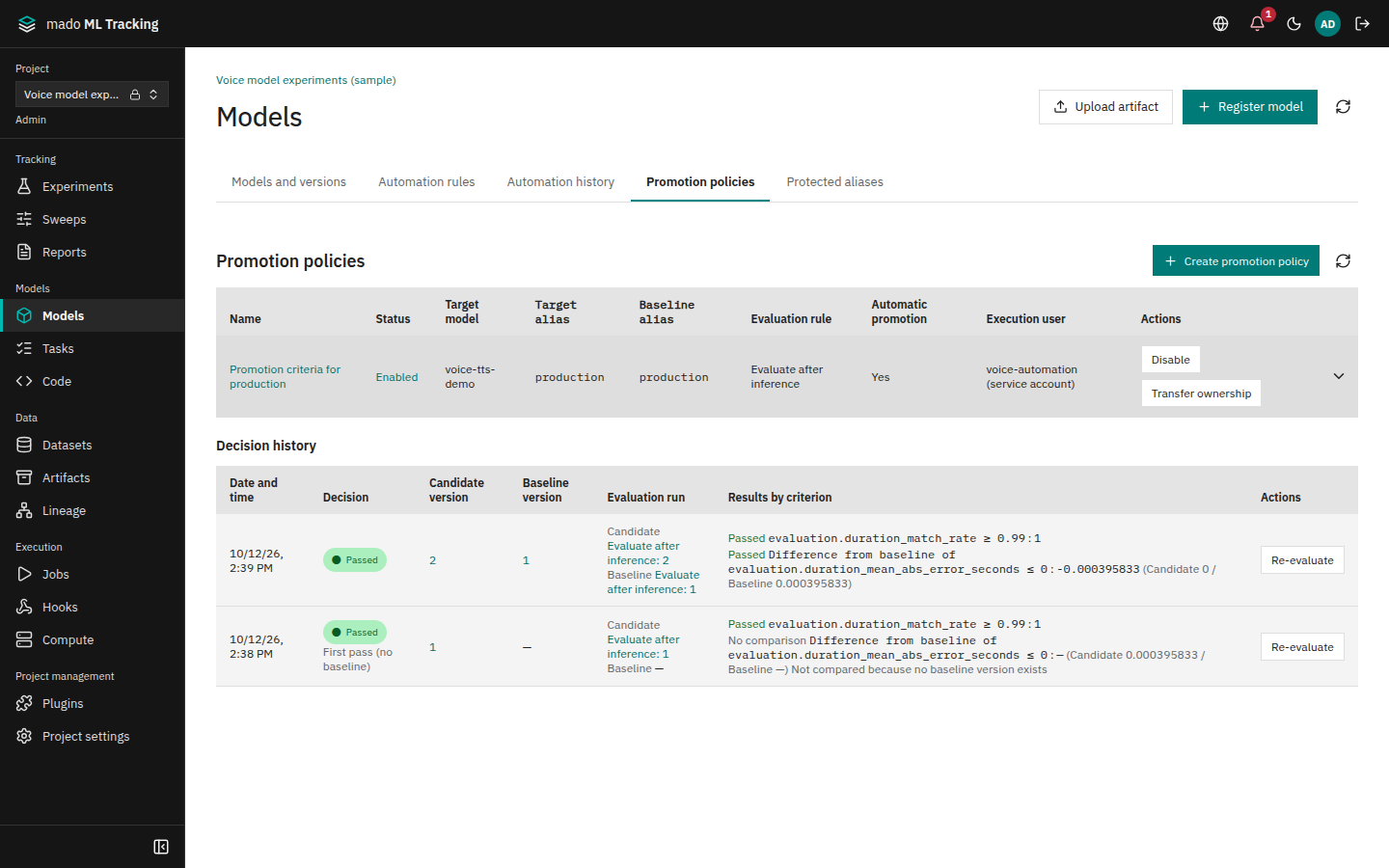
You can compare a new version's evaluation with that of the version production points at (the baseline). A promotion policy decides pass or fail when the evaluation Run ends, and can also move an alias to the version that passed.
When to use it
- Check whether a new version beats the current production version on the same evaluation data and code
- Automate decisions with criteria such as "WER drops by at least 5%"
- Make only passing versions
production, and record a reason when promoting a failing one - See later who switched the production version, when, and on which decision
Compare evaluation results
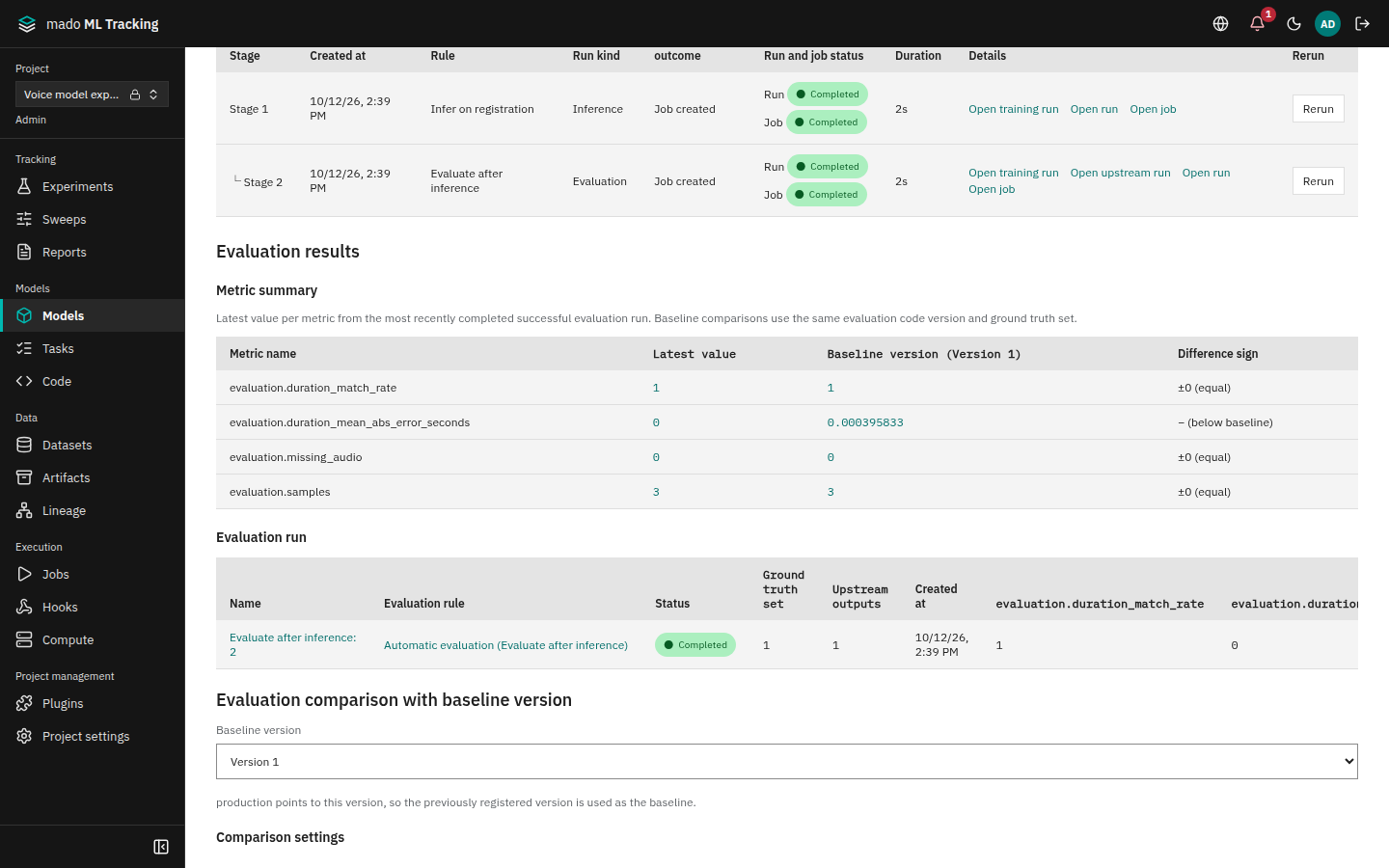
Evaluation results on a version page shows the version's evaluation metrics and the comparison with the baseline.
- Metric summary: values from the newest successful evaluation Run, the baseline values, and the sign of the difference.
- Evaluation run: the evaluation Runs of this version, with the rule that ran each automatic one.
- Evaluation comparison with baseline version: after choosing Baseline version, the candidate, baseline, difference, and relative difference per metric, plus the reference set and evaluation code version used.
The difference is candidate − baseline, and the relative difference is difference ÷ |baseline|. The comparison does not judge whether higher or lower is better; promotion policies define that.
Which evaluation Runs are compared
Candidate and baseline evaluation Runs are compared only when all of these match:
- Same Project, run kind evaluation, status finished
- Same reference set (the input dataset versions used for evaluation)
- Same evaluation code version
Inputs of a chained evaluation Run also include the inference output, which differs for every version. The comparison therefore ignores it and uses only the reference set pinned in the rule.
When no matching Run exists, the panel shows a message instead of an error:
| Message | What to do |
|---|---|
| The baseline alias is not set | Set an alias on the baseline version |
| This version has no finished evaluation Run | Apply the evaluation rule to this version |
| The baseline has no finished evaluation Run with the same reference set and code version | Apply the same evaluation rule to the baseline version |
When the baseline alias points at the candidate itself, the previously registered version is used as the baseline.
Running evaluation with an automation rule is the reliable way to get matching conditions, because the rule pins the evaluation code version and input dataset versions.
Create a promotion policy
A promotion policy says "decide versions of this model using results of this evaluation rule". Only Project admins create them.
- Open Promotion policies in Models and press Create promotion policy.
- Fill in the fields and save.
| Field | Meaning |
|---|---|
| Name | For example promotion to production |
| Target model | The model to decide |
| Target alias | The alias that should point at passing versions, for example production. The names the model's aliases, other policies and alias protections use are offered; a name not used yet is marked as a new alias |
| Baseline alias | The alias of the version to compare with. Default production. Offered like the target alias |
| Evaluation rule | An enabled evaluation rule that handles the model's family. Only Runs created by this rule are decided |
| Pass criteria | 1 to 50 criteria. All must pass |
| When the baseline alias is not assigned | Pass (first release) or fail |
| Automatically switch the target alias after passing | Off by default |
- Check that the new policy is Enabled. Open a row of the list to read its criteria. Execution user names the user who decides, as a person or a Service Account.
If the model's evaluation rule is disabled, the form says so; enable it in Automation rules to choose it.
Like rules, policies can only be enabled or disabled after creation. To change criteria, create a new policy and disable the old one. Past decisions stay readable with their original criteria.
Writing criteria
Each criterion has a metric, a direction (Higher is better or Lower is better), a value to compare, and a threshold. Metric offers the metric names the chosen rule's evaluation Runs recorded (before the rule has any, those recorded by Runs of the same evaluation code version). A name they never recorded shows a warning: the decision would find no value and fail.
| Value to compare | Compared with the threshold |
|---|---|
| Candidate value | The candidate's value |
| Difference from baseline | candidate − baseline |
| Relative difference from baseline | (candidate − baseline) ÷ |baseline|, entered as a ratio (0.05 is 5%) |
Higher-is-better passes when value ≥ threshold, lower-is-better when value ≤ threshold. Exactly the threshold passes.
| Example | Metric | Direction | Value | Threshold |
|---|---|---|---|---|
| accuracy at least 0.8 | accuracy | higher | candidate value | 0.8 |
| accuracy does not drop from the baseline | accuracy | higher | difference | 0 |
| WER drops by at least 5% from the baseline | wer | lower | relative difference | -0.05 |
For lower-is-better metrics, use a negative threshold to require improvement.
Decisions
When an evaluation Run created by the policy's rule finishes, it is decided right away and recorded in Decision history.
| Decision | Meaning |
|---|---|
| Passed | All criteria passed |
| Failed | At least one criterion failed. Missing, NaN, and infinite values fail |
| Cannot evaluate | Required evaluations are missing, for example the baseline has no evaluation from the same rule |
| Skipped | The policy's run-as user lost access, or an error occurred |
- If the baseline alias does not exist yet, the policy setting applies. With pass, difference criteria are treated as passed and the decision shows a first release; candidate-value criteria are still checked.
- Evaluation Runs created by people or by other rules are not decided. Anyone with the editor role can create evaluation Runs, so only the rule's own Runs count.
- Failed and canceled evaluation Runs are not decided.
The decision history is append-only. A Project admin can press Re-evaluate to add a new decision against the current baseline alias, for example after evaluating the baseline to resolve an insufficient decision.
Promote automatically on pass
With Automatically switch the target alias after passing enabled, a pass at the end of the evaluation Run moves the target alias to the candidate.
- If someone changed the alias by hand during the decision, that change is not overwritten. The version page shows that automatic promotion was skipped because the baseline alias changed.
- If the candidate already has the target alias, nothing happens.
- Re-evaluate never moves the alias. To promote on a re-evaluation, a person selects it as evidence in the promotion dialog.
- An automatic promotion appears in the alias history with the path promotion policy, the policy name, and a summary of the values.
Move policy ownership
A policy decides with its run-as user's permissions, and automatic promotions are recorded as that user's actions. The run-as user is initially the creator; if they stop being a Project admin, decisions become skipped. For long-lived policies, use Transfer ownership to move ownership to an admin Service Account.
Promote by hand
Press Promote in Promotion decision on a version page, or Assign alias in Models, to open the promotion dialog.
- Specify Alias and Version.
- In Supporting decision, select a passing decision for this version. A protected alias that requires a passing decision cannot be saved without one.
- Without a passing decision, or when promoting a failed version, enter Reason.
- Press Save and check the alias list and alias history.
A decision made before the baseline alias moved to another version was not compared with the current baseline, so it is not selected as evidence automatically.
Protect an alias
You can restrict who may change aliases such as production by hand. Only Project admins add, change, or remove protections.
- Open Protected aliases in Models and press Add protected alias.
- Choose Applies to (the whole Project or one model), the alias, Required role, and Require a passing decision, then save.
| Setting | Who can change it by hand |
|---|---|
| admin only | Project admins (including global administrators), with a passing decision or a reason |
| editor or higher, passing decision required | editor or higher, only with a passing decision for this version and alias as evidence |
| editor or higher, no decision required | editor or higher, with a passing decision or a reason |
| admin only, passing decision required | Project admins, only with a passing decision |
- If both a Project-wide and a model-specific protection exist, the stricter of each setting applies. A model setting cannot loosen the Project setting.
- Protected aliases cannot be changed through the MLflow 3 compatible API (
set_registered_model_aliasand similar returnPERMISSION_DENIED), because it cannot carry a reason or decision. Use the web UI or the native API. - Only Project admins can remove a protection that requires a passing decision.
History
| What | Where |
|---|---|
| When and by whom an alias moved | Alias history in Models |
| Which version passed or failed which criteria | Decision history in promotion policies, and Promotion decisions for this version on the version page |
| Creating and changing policies and protections | The audit log (Audit log) |
All of these are append-only.
Write an evaluation results file
When an evaluation Run saves per-sample results as a jsonl Artifact, the Run's Artifacts tab shows them as a table with audio playback, a character diff between reference and prediction, and sorting by score.
{"audio": "eval/audio/0001.wav", "reference": "It is sunny today", "prediction": "It is rainy today", "score": 0.29}
{"audio": "mmt-artifact://runs/<inference Run ID>/container/outputs/0002.wav", "reference": "Hello", "prediction": "Hello", "score": 0}- Columns are
audio,reference,prediction, andscore. A table with anaudiocolumn, or with bothreferenceandprediction, is shown as evaluation samples. - A relative
audiopath is resolved as an Artifact of the Run that saved the table. Refer to upstream inference audio withmmt-artifact://runs/<inference Run ID>/<stored path>; only Runs of the same Project resolve. - CSV with a header row is also read. Unreadable rows are not guessed; their line numbers and reasons are shown.
See Audio viewer for the audio display.
Permissions
| Action | Required role |
|---|---|
| View comparisons, policies, and decisions | viewer or higher |
| See the promotion check on a version page | editor or higher |
| Change an alias by hand | editor or higher (protected aliases depend on the protection) |
| Create policies, enable and disable them, move ownership, re-evaluate, set protections | Project admin |