Models and versions
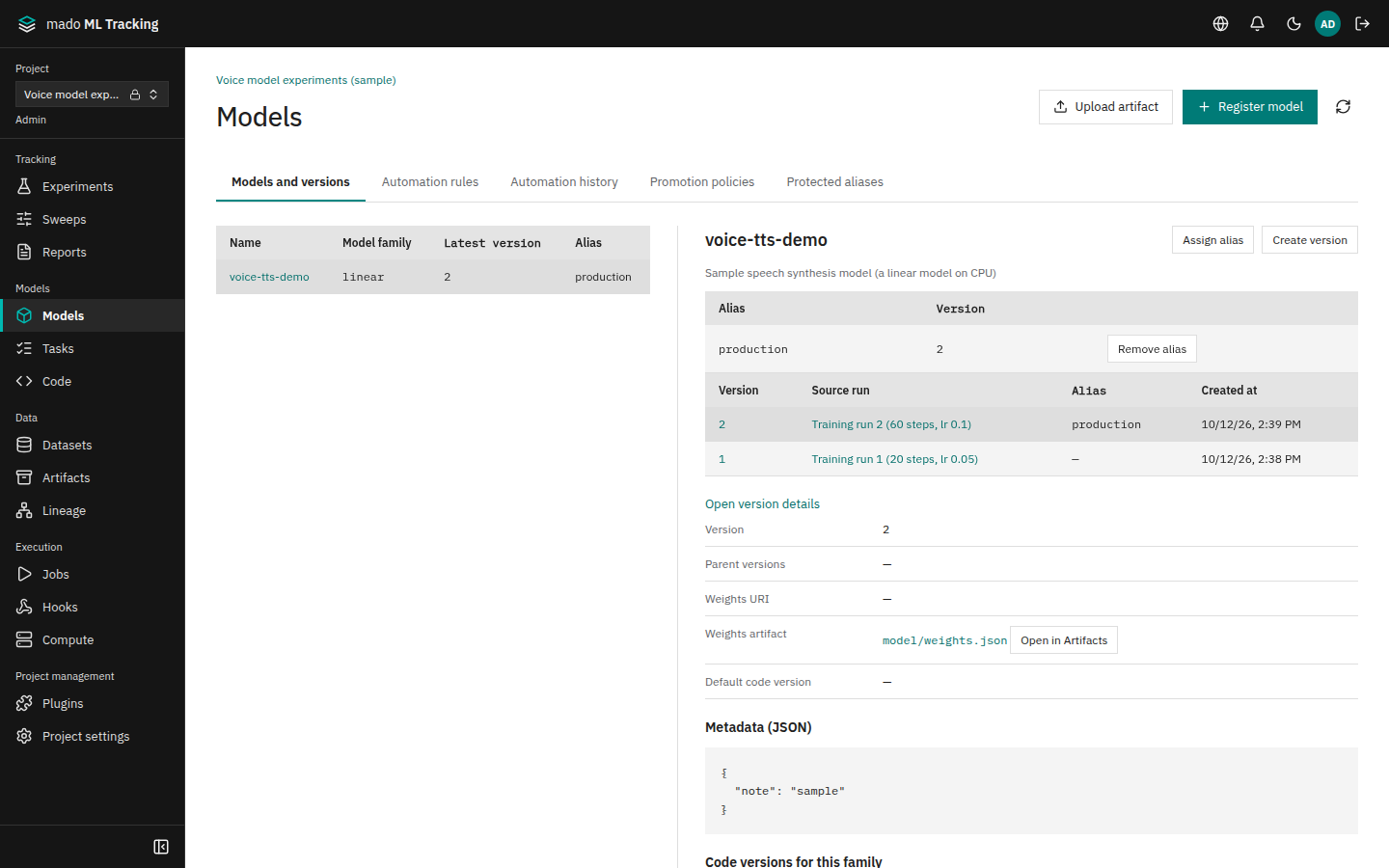
The Models and versions tab of Models registers trained weights as model versions and uses aliases to point at the version currently in use. A version cannot be changed after registration, so you can always tell which weights a Run used for inference or evaluation.
When to use it
- Keep the weights a training Run produced together with the Run that produced them
- Refer to a model by an alias such as
productioninstead of a version number in inference and evaluation code - Run inference and evaluation automatically whenever a new version is registered (Automation after registration)
- Switch the production version only after checking evaluation results (Evaluation and promotion)
Models, versions, families, and aliases
| Term | Meaning |
|---|---|
| Model | A name that groups versions. It has a name, a model family, and a description. The name and family cannot be changed after creation |
| Version | The result of one training. It holds the weights (an Artifact or a URI), the source Run, parent versions, a default code version, and metadata. It cannot be changed after registration |
| Model family | A string for the kind of model architecture, such as qwen3 or linear. It is matched against a code version's supported model families and an automation rule's target families, so code never runs a model it was not written for |
| Alias | A name that points at a version, such as production or candidate. Every change records when, who, and from which version to which version |
Version fields:
- Source Run: the training Run that produced the weights. The version page links to it.
- Parent versions: the versions a fine-tuning started from. Only versions of the same family can be selected.
- Weights Artifact or weights URI: where the weights are. The worker downloads them before inference or evaluation.
- Default code version: the code version used by default to run this version. Only code versions that support the version's family can be selected.
Create a model
You need the editor role in the Project. An API token also needs the registry:write scope.
- Open Models and press Register model.
- Enter the model name in Name and choose the family in Model family from the candidates, for example
voice-ttsandlinear. The candidates are the families the Project's models and code versions use, with how many use each; type a new family as it is. Use the same string as the code version's supported model families. Families that differ only in letter case, such asQwen3andqwen3, are different families and do not match; typing one shows a warning. - Press Save and check that the model appears in the list on the left.
Register a version
There are five ways to register a version. To go from training to registration without manual steps, use the Task output setting or register from the training code.
| Method | Version name | Suitable for |
|---|---|---|
| Create version in the web UI | Numbered automatically when left empty | Registering weights created elsewhere |
| Task output model setting | Numbered automatically (a version name template is also available) | Registering the weights of successful training without changing the training code |
Python SDK register_output_model() | Numbered automatically when omitted | Registering from inside the training code |
MLflow register_model() or log_model(registered_model_name=…) | Numbered automatically | Training already logged with the MLflow 3 SDK |
models in a container's result.json (version 2) | Numbered automatically | Training in a container without the SDK |
Register from the web UI
- Select the model in the list and press Create version.
- Leave Version empty to get the number shown under it (for example "Leave blank to use 3."). Enter a name only when you want one.
- Select the training Run in Source run. Only training and fine-tuning Runs are offered.
- Weights artifact lists the source Run's Artifacts; press the weights file to choose it. You can narrow the list by saved path. Without a Run, the Project's Artifacts are listed, newest first. A file uploaded with Upload artifact is chosen as it finishes. Pasting an Artifact ID, or the
artifact://…shown after an upload, also chooses it. Enter weights that are not an Artifact (on S3, for example) in Weights URI. - Optionally select Parent versions and Default code version, then press Save. When no code version supports the family, the reason and a link to Code appear under Default code version.
- Check that a new row appears in the version list and that Latest version has changed.
Register from training code
With the Python SDK, save the weights inside the training Run and register them. If the model named by model_name does not exist, it is created with the given family.
from mado_tracking import Client

with Client() as client:
    with client.start_run(
        project_id="<project-uuid>",
        experiment_id="<experiment-uuid>",
        name="train-v3",
        kind="training",
    ) as run:
        ...  # train and save weights.bin
        artifact = run.log_artifact("weights.bin", path="model/weights.bin")
        version = run.register_output_model(
            model_name="voice-tts", family="linear", artifact_id=artifact["id"],
        )
        print(version["version"])  # the assigned version name, for example 3
With the MLflow 3 SDK, set the family in the registered model's mmt.model_family tag. See Log with the MLflow 3 SDK for the connection settings.
version = mlflow.register_model(recorded.model_uri, "voice-tts")
loaded = mlflow.pyfunc.load_model("models:/voice-tts@production")
Automatic version numbering
When the version name is omitted, versions are numbered 1, 2, 3, and so on for each model, following the same rule as MLflow.
- The web UI, the Python SDK, MLflow, Tasks, and
result.jsonall share one sequence per model. Registrations from different paths never collide. - Numbers of deleted versions are not reused.
- Registering an explicit integer such as
10moves the next number to11. - Non-integer names such as
v1and numbers with 19 or more digits are ignored when numbering. Existing versions with such names are kept. - Registering a name that already exists is rejected (409).
Set an alias
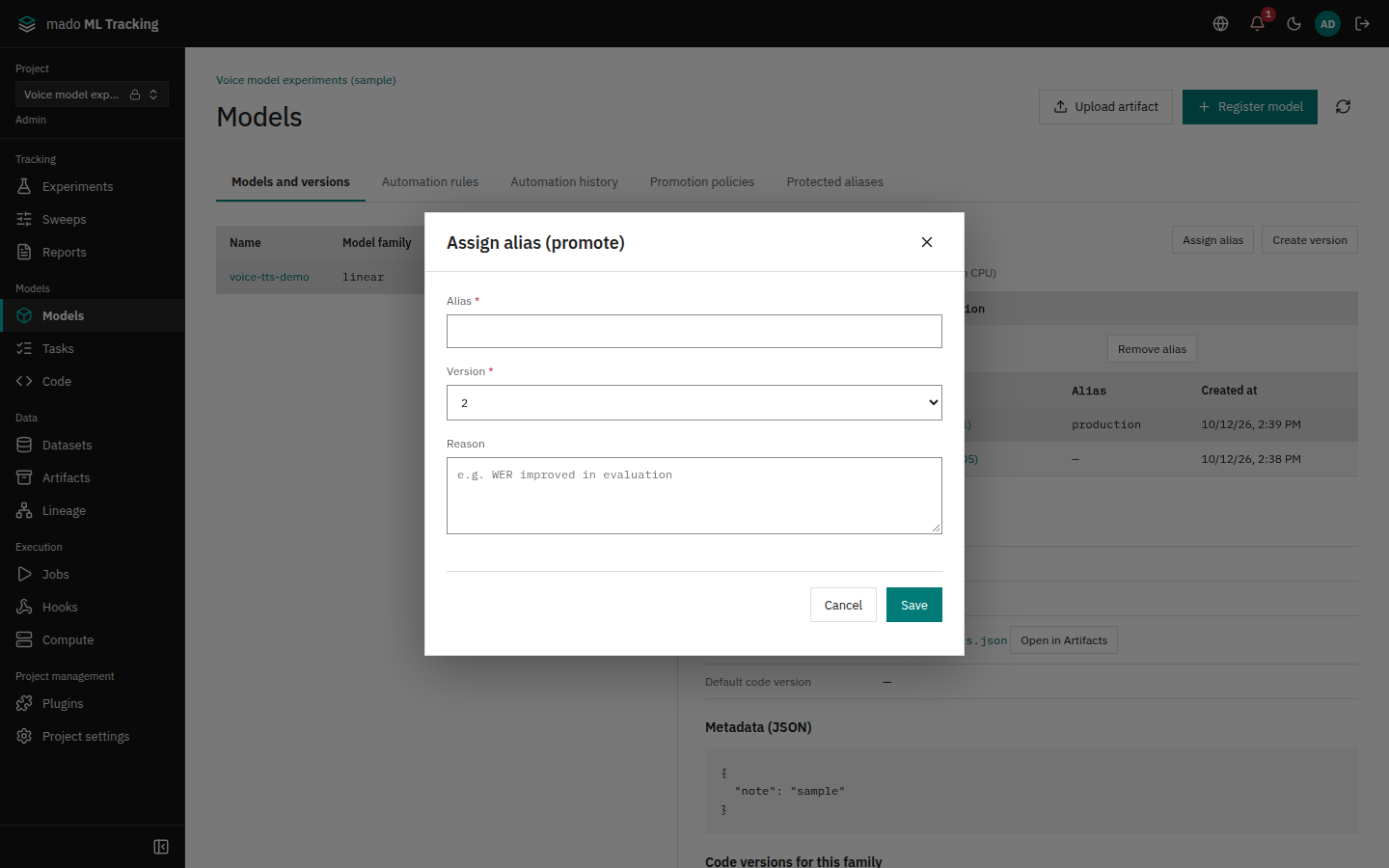
- Select the model and press Assign alias.
- Enter the alias in Alias and choose the version in Version, for example
productionand3. - Enter the reason in Reason and press Save. The reason is optional, but a protected alias may require it.
- Check that the alias points at the version in the alias list.
To remove an alias, press Remove alias in the alias list. Removals are recorded too. A protected alias carries a lock and the role it needs (for example Protected alias (Admin only)) in the list; without that role, the list says which role removal needs instead of showing Remove alias. Only Project Admins can remove a protected alias that requires a passed check.
When you start an inference or evaluation Run with an alias, the Run stores the version the alias pointed at at that moment. Moving the alias later does not change past Runs.
Alias history lists the time, the old and new version, the actor, and the path of each change (Web, API, MLflow, promotion policy, version deletion, model deletion), newest first. The history is append-only.
You can restrict who may change important aliases such as production. See Protected aliases.
Open a version
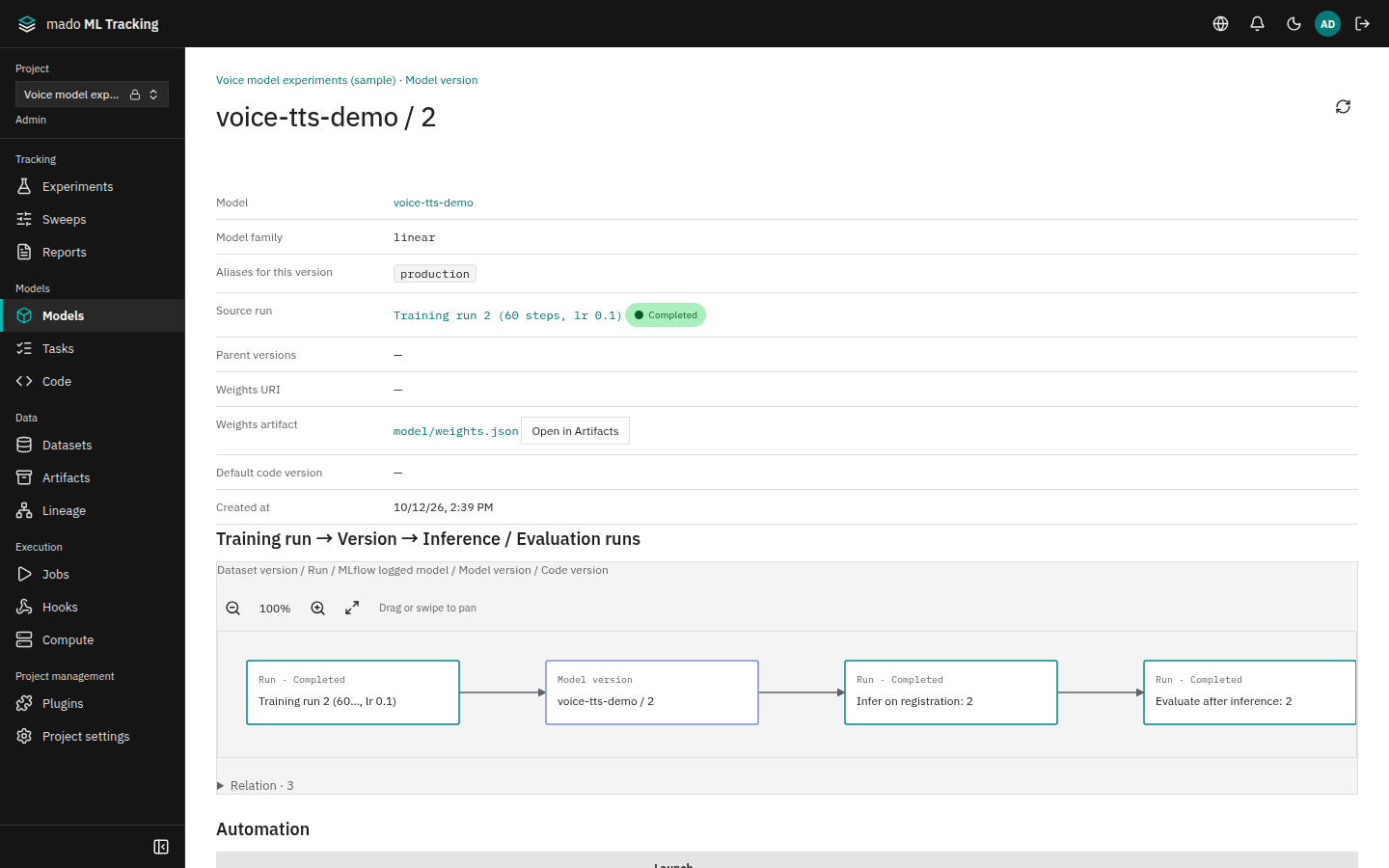
Press a version's number in the version list to open its page. The list shows the newest 20 versions; Load more shows the rest. The Alias column names the aliases that point at each version.
Code versions for this family in a Model's details lists the code versions whose Supported model families include the Model's family. These are the code versions a Task or an automation rule can choose for the Model.
- Datasets → Training run → Version → Inference / Evaluation runs: the datasets used for training, the training run that produced the version, and up to 20 of the newest runs that used it.
- Automation: automation runs triggered by this version.
- Evaluation results: the latest metrics of successful evaluation Runs and the comparison with the baseline version (Evaluation and promotion).
- Promotion decision: whether the version passed each promotion policy.
Follow relationships in Lineage
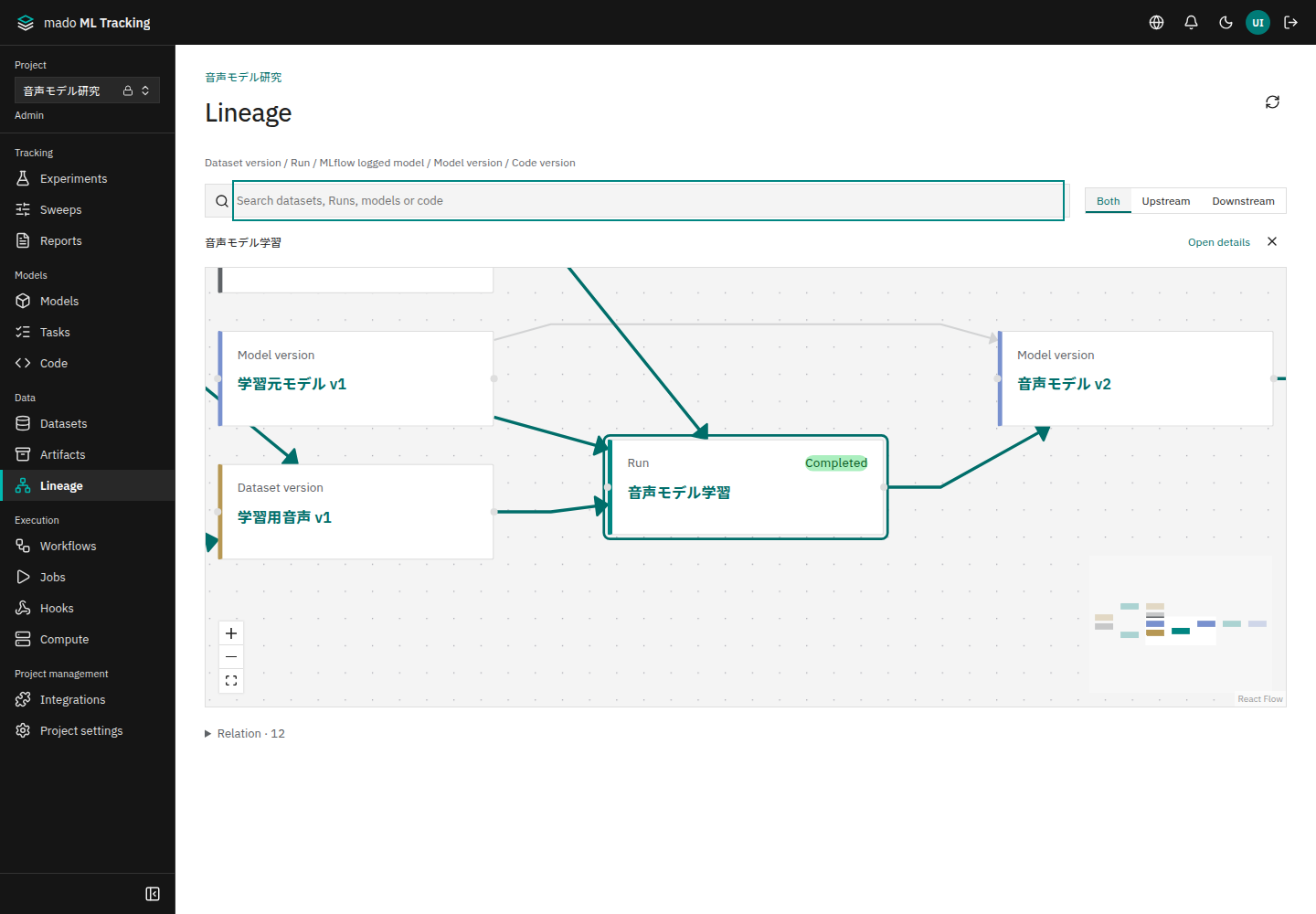
Lineage draws dataset versions, Runs, MLflow logged models, model versions, and code versions of the Project in one graph. Read it from left to right to see which data trained a version and which version produced an inference output.
Search for an item by name or kind, then select it to highlight its connected path. Choose Both, Upstream or Downstream to follow the relationship in either direction. Open details or the item's name opens its original page. Drag or swipe to pan, scroll or pinch to zoom, and use the controls at the bottom left to fit the graph. Larger graphs have an overview at the bottom right for moving around.
The model version page uses the same graph controls. On narrow screens, the relations table opens before the graph. Switching languages preserves your search input and selection.
Edges are data input, data output, model input, model output, model registration, parent model, parent dataset, parent Run, and code. Open Relation below the graph to see the edges as a table. The table names the kind of each end (Run, dataset version, and so on) before its name, and the name links to its page.
Click View in Lineage in a dataset version's details to show only two steps before and after that version. Show full graph at the top returns to the whole Project.
Permissions
| Action | Required role |
|---|---|
| View the list, version pages, and Lineage | viewer or higher |
| Create models and versions, set and remove aliases | editor or higher (registry:write for API tokens) |
| Change a protected alias | Depends on the protection (Protected aliases) |
Next steps
- In Tasks and code versions, register a version when training succeeds.
- In Automation after registration, run inference and evaluation for each new version.
Link training history to an existing model
After registering weights stored in S3 or another location, open the model version and choose Link training source. The version ID, weights reference and aliases are preserved.
Choose Use an existing training run to link the completed run that produced the weights. If the training has not been recorded, choose Record past training and enter its experiment, kind, exact dataset versions and configuration. Leave unknown dates empty. This records history without starting a job.
The lineage then connects datasets to the training run and model version. Training sources cannot be replaced, so verify the recipe first. Filtered and unfiltered data with the same batch name must be treated as distinct versions.
The Python SDK supports the same operation. model_id and version_id identify existing MMT records, and run_id is an MMT run in the same project. Keep another tracking server's run ID in evidence or tags.
client.associate_model_training_source(
    project_id,
    model_id,
    version_id,
    run_id=run_id,
    evidence={"recipe": "reference-to-verified-training-config"},
)
Register synthetic data in Datasets with its S3 URI and the SHA-256 of the referenced object, then select the exact version as a training input. Record data added during training in training data history.
The model page lists datasets used across the training run. For an intermediate checkpoint, inspect the run's training data history and the starting steps of each configuration.