Compare Runs
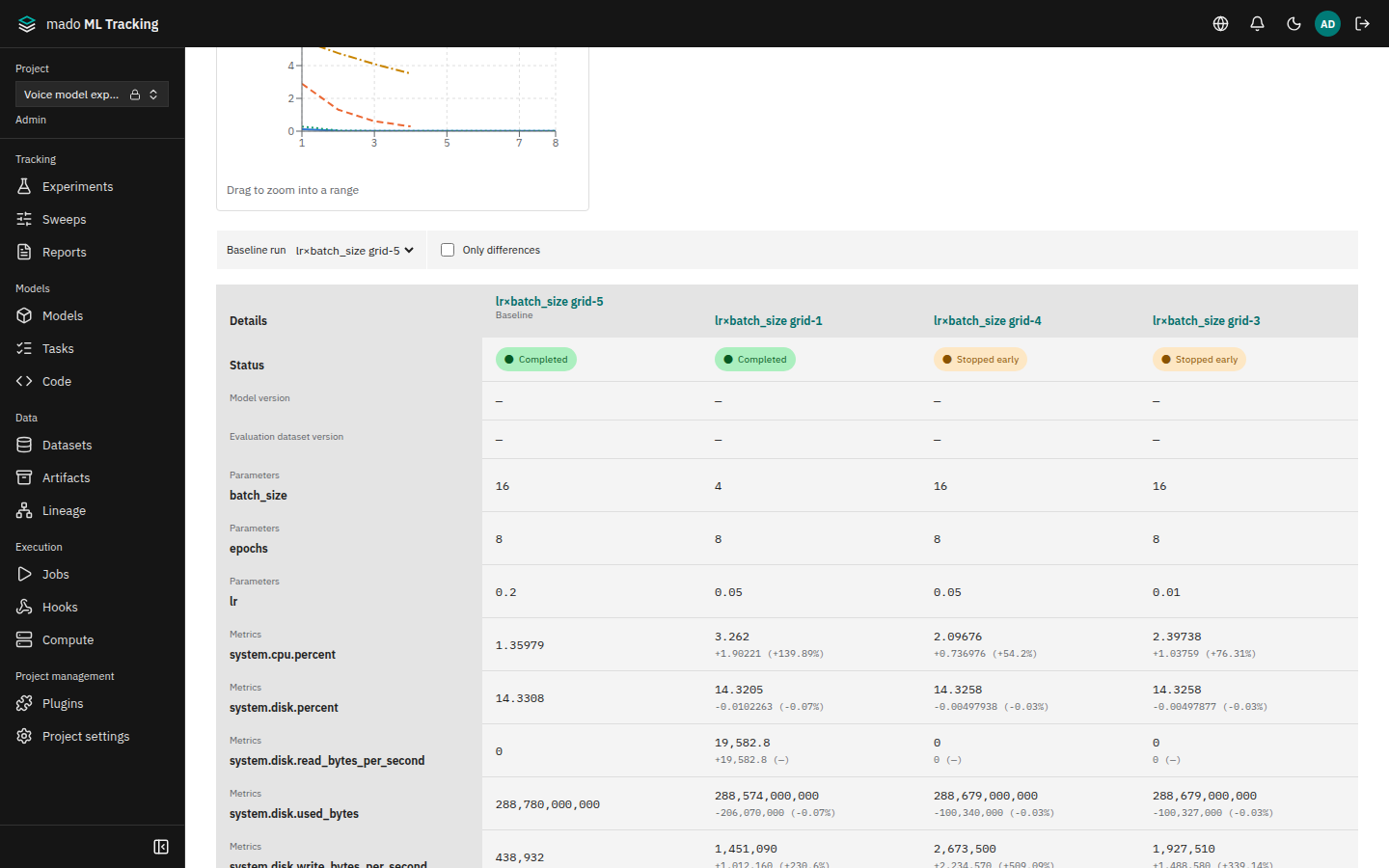
The comparison page lines up the params, metrics, and tags of the selected Runs in one table. When you choose a baseline Run, each metric shows its difference from the baseline. The Analysis tab uses parallel coordinates, parameter importance, and scatter plots to show which params affected the result.
When it helps
- Checking in numbers how much each metric improved across three Runs that differ only in learning rate
- Seeing which model version and evaluation dataset version each evaluation Run used
- Finding the params that matter among 30 Sweep trials
Open the comparison page
- Under Experiments, select the Runs to compare. Runs from different Experiments can be selected under All experiments
- A selection bar such as 2 runs · Selected appears above the table; choose Compare
You can compare 2 to 50 Runs. The page URL contains the selected Runs and the baseline, so you can share it as is.
| Tab | Content |
|---|---|
| Details | The comparison table and metric charts of the selected Runs |
| Artifacts | Artifacts with the same path in every Run, side by side |
| Media | Per-step audio and images (Media Logging and Listening) |
| Analysis | Parallel coordinates, parameter importance, scatter plot |
Read the comparison table
Columns are Runs and rows are items: status, model version, evaluation dataset versions, params, metrics, and tags.
- Choose a Run in Baseline run to mark its column Baseline. Other Runs then show, below each metric, the difference (value − baseline) and the relative change (÷ |baseline|). No difference is shown when either value is missing or NaN
- Only differences hides rows where every Run has the same value
- Metrics are each Run's latest value
- Download CSV saves the same table (items as rows, Runs as columns) as UTF-8 CSV with a BOM. With a baseline, a difference row follows each metric row
Add chart adds charts, which work as described in Metric Charts.
Python gets the same comparison:
from mado_tracking import Client

with Client() as client:
    comparison = client.compare_runs("PROJECT_ID", ["RUN_B", "RUN_A"], baseline_run_id="RUN_A", metric_keys=["wer"])
    client.export_comparison_csv("PROJECT_ID", "compare.csv", run_ids=["RUN_B", "RUN_A"], baseline_run_id="RUN_A")
Analyze search results
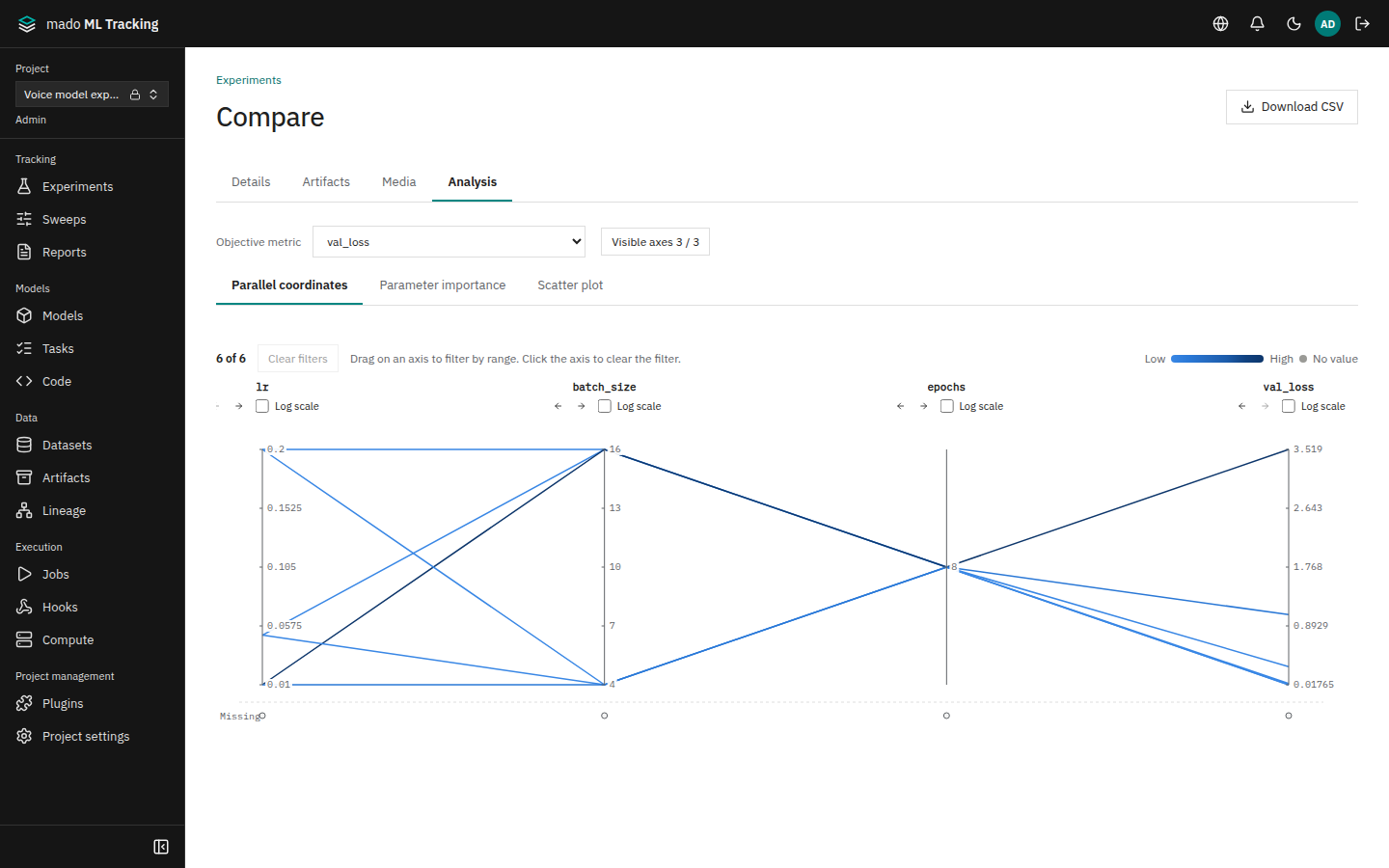
The analysis appears on the comparison page, beside the charts in the Run list when charts are shown (below them on narrower screens), and on Sweep details. It covers the search results in the Run list and the trial Runs in a Sweep, up to 5,000 Runs.
First choose the metric that defines good and bad in Objective metric. Sweeps also offer the trials' objective value.
Parallel coordinates
Params and the target metric become vertical axes, and each Run is a line across them, colored by the target metric from light (small) to dark (large).
- Drag along an axis to keep only Runs passing through that range; several axes can be filtered. Click an axis to clear its filter, or Clear filters to clear all
- The filtered Runs are listed below; select one to open it
- Visible axes chooses axes, the ← → buttons reorder them, and Log scale makes an axis logarithmic
- Runs without a value sit at Missing below the axis
Parameter importance
A table of how each param relates to the target metric.
| Column | Meaning |
|---|---|
| Importance | Contribution when a random forest predicts the target metric. Importance calculation switches between Impurity reduction and Permutation |
| Correlation | Correlation with the target metric. Positive means larger values go with a larger target |
| Coverage | Share of Runs that recorded the param |
| Type | Numeric or Categorical |
- With fewer than 5 Runs that have the target value, only correlation is shown
- The out-of-bag R² of the prediction model is shown above the table. When it is low, do not read too much into importance differences
- Categorical params with more than 50 distinct values are excluded; excluded params and reasons are listed below the table
- The same set of Runs always gives the same result
Scatter plot
Choose a param or metric for X axis and Y axis to plot Runs as points; Color colors them by another item. Click a point to open that Run.