Audio viewer
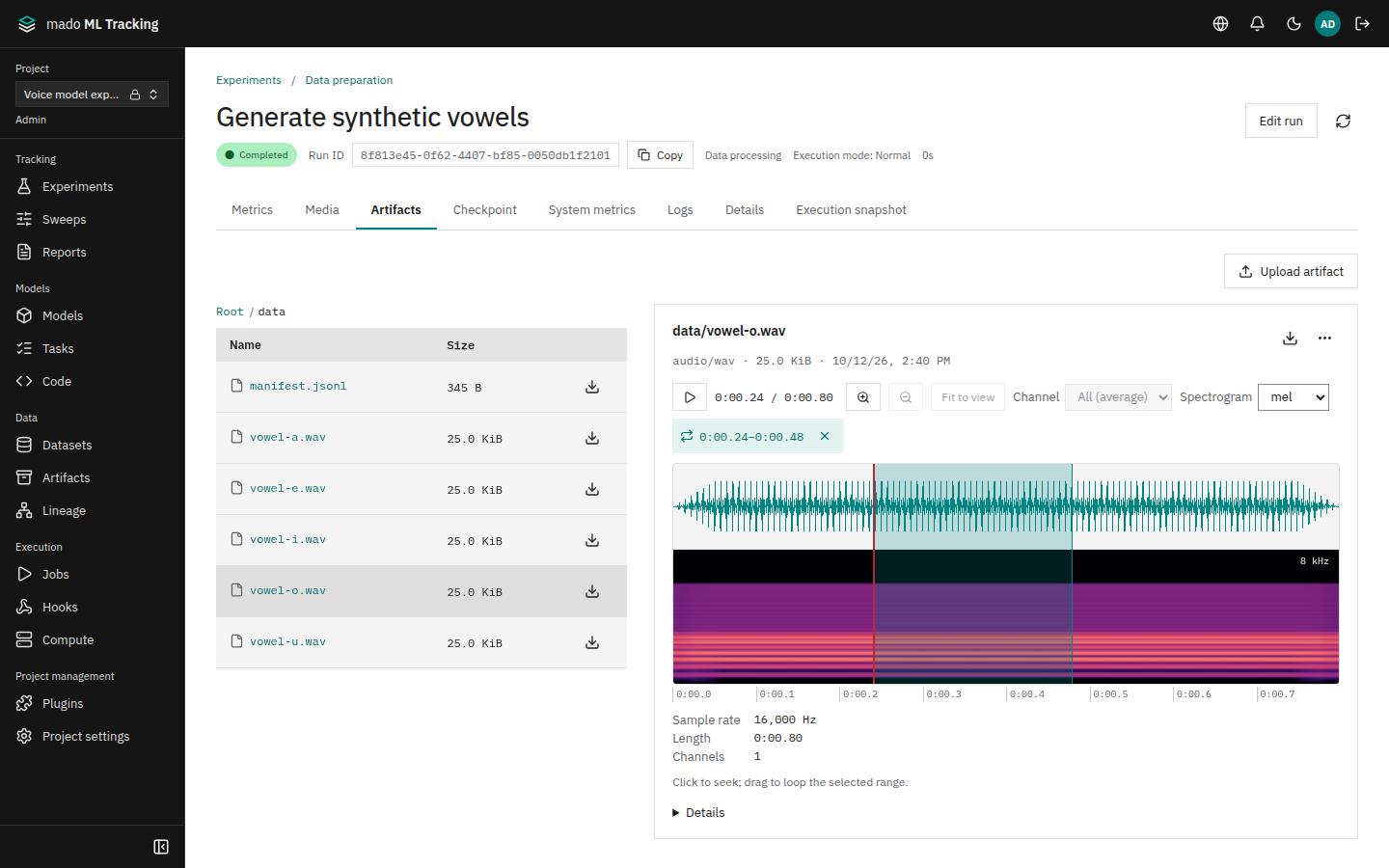
Opening an audio Artifact shows the audio viewer. It displays the waveform and spectrogram together, plays from where you click, and loops the section you drag. Analysis runs in the browser without external services or libraries.
The audio viewer is used in Artifact previews for Runs and datasets, the Run Media tab, media comparison on the Compare page, and media blocks in shared reports.
When to use it
- You want to listen to generated audio while checking the waveform for noise or dropouts.
- You want to loop only the section you are interested in.
- You want to compare audio from different training steps on a mel spectrogram.
- You want to see where the sound is in a recording longer than an hour.
Supported formats
WAV, FLAC, MP3, Ogg, Opus, M4A (AAC), and WebM. If the browser cannot decode a file, the viewer shows "Could not decode audio. This format may not be supported by your browser."
For WAV and FLAC, the duration, sample rate, and channel count are read from the file header when it is saved, so they are shown before the audio is decoded. Other formats get these values from ffprobe when the server generates a preview.
Controls
| Control | What it does |
|---|---|
| Play, pause | The toolbar button toggles playback |
| Click | Click the waveform or spectrogram to move to that position |
| Drag | Loops the dragged range. Clear loop removes it |
| ←, → | Move 1 second backward or forward |
| Zoom in, Zoom out | Change the visible range by a factor of 2. At the maximum zoom, 0.05 seconds is shown |
| Fit to view | Reset the zoom |
| Position | A slider shown while zoomed in that moves the visible range. Above it, the times of the visible range are shown (Visible range 0:02.25–0:06.75) |
| Channel | All (average) or Channel 1, Channel 2, … Available for audio with two or more channels |
| Spectrogram | Linear (default) or mel |
Time is shown as minutes:seconds.hundredths, such as 0:00.80. A time ruler runs under the waveform and spectrogram; when zoomed in, its ticks follow the visible range. The top right of the spectrogram shows the highest frequency displayed (half the sample rate).
There is no control for playback speed.
Spectrogram
The browser computes the spectrogram with these settings:
- FFT size 1024 and hop size 256 samples
- Up to 2048 columns; long audio is summarized per column
- 80 mel bands
- Values below −100 dB use the darkest color
Long audio previews
Decoding audio over 64 MiB in the browser would exhaust memory, so the browser does not analyze it. Instead, the preview worker on the server generates the waveform and a spectrogram image.
| State | Display |
|---|---|
| Generating | "This file exceeds 64MiB. The server is generating its waveform and spectrogram. Playback is available." The state is checked every 5 seconds |
| Ready | The full waveform and a linear spectrogram |
| Failed | "Server-side waveform and spectrogram generation failed. Playback is available." |
| No preview | "Waveforms and spectrograms are unavailable for files over 64MiB. Playback is available." For example when the preview worker has no ffmpeg, or the audio was saved before the preview worker was set up |
In a ready preview, clicking and ← and → still move the position. Zoom, channel selection, and mel are not available. Playback loads only the parts it needs, so even audio of several gigabytes starts playing quickly.
The server generates previews for these Artifacts, decided when they are saved:
- Audio over 64 MiB
- Audio whose duration cannot be read from the header (MP3, M4A, Ogg, Opus, AAC, and so on)
- Video (an image of the frame at 1 second or at 10% of the length, whichever comes first)
Previews are saved as Artifacts in the same Project under .previews/<original Artifact ID>/. The original Artifact is not changed. Artifacts saved before the preview worker was set up get no preview.
Run the preview worker
The preview worker runs as a separate process from the API. It needs ffmpeg and ffprobe, so run it with the bundled Dockerfile.preview (the preview service in Docker Compose).
docker compose up -d previewGive the preview worker the same database URL as the API (MMT_DATABASE_URL), the storage environment variables (ARTIFACT_FILESYSTEM_ROOT, S3_*), and MMT_STORAGE_SECRET_KEY. The whole file is copied into its temporary directory (MMT_PREVIEW_WORK_DIR), which needs room for MMT_PREVIEW_MAX_SOURCE_BYTES (10 GiB by default); larger Artifacts get no preview. One ffmpeg run is stopped after 30 minutes by default (MMT_PREVIEW_TOOL_TIMEOUT_MS).